
4K AI-Powered Conference Webcam with Microphones Speakers
4.1Editor score
AI auto framing for group meetings
120 degree wide angle coverage
Plug and play USB setup
Discover the top auto tracking conference camera systems for 2026, comparing 4K PTZ models, AI features, and audio solutions for seamless meetings.
Modern meetings demand seamless connectivity and professional presentation. An auto tracking conference camera ensures every speaker remains centered without manual adjustment. These intelligent devices use advanced algorithms to follow movement, providing a dynamic view for remote participants. Selecting the right system enhances collaboration and keeps everyone engaged.
This guide evaluates ten leading conference camera systems designed for various room sizes. We compared image quality, tracking accuracy, audio clarity, and connectivity options. Each product was analyzed for its ability to simplify setup and deliver reliable performance. Our review highlights top picks for budget, premium, and specific use cases.
Each selection includes detailed specifications, pros, cons, and real-world application insights. Prices fluctuate frequently, so verify current listings before purchasing. The following sections provide a deep dive into features that matter most. Whether for small huddles or large halls, these cameras redefine remote communication standards.
4.1Editor score

4.8Editor score

4.6Editor score
This table provides a side-by-side overview of the ten selected auto tracking conference camera systems. It highlights key specifications like resolution, zoom capability, and connectivity to help you quickly identify the best fit for your meeting space needs.




This system combines a high resolution camera with a robust speakerphone for complete meeting readiness. Rated 4.8, it delivers 4K video and clear audio for professional conferencing. The AI auto tracking ensures speakers are always framed perfectly without manual adjustment.
We may earn a commission when you buy through this link, at no additional cost to you.
The 3x optical zoom maintains image sharpness when focusing on details or documents. Its Bluetooth 5.0 speakerphone connects easily and reduces background noise effectively. The wide angle lens captures large groups comfortably, making it ideal for church or office environments.
While the setup involves two devices, the benefits of a unified audio video kit outweigh the minor complexity. Users note the tracking algorithm is smoother than many competitors. It handles movement gracefully, ensuring remote participants feel included in the conversation.
Buy this if you need a professional turnkey solution for medium rooms. It suits worship services, boardrooms, and medical consultations well. The reliable support team adds peace of mind for long term business deployments.
The 4K resolution provides crisp visuals that help remote attendees read text and see expressions clearly.
The included speakerphone ensures audio quality matches the high standard of the video feed.
We may earn a commission when you buy through this link, at no additional cost to you.
Designed for small meeting spaces, this webcam offers 4K clarity at an attractive price. It features AI auto framing to keep all attendees visible. The physical lens cover adds a layer of privacy often missing in budget units.
We may earn a commission when you buy through this link, at no additional cost to you.
Its dual microphones cancel background noise effectively for clear voice pickup. The setup is straightforward requiring no IT intervention. Users find it ideal for quick team check-ins or remote workstations.
The tracking is reliable for stationary meetings but less dynamic than premium models. Audio coverage works well for tables up to five meters. This limitation is acceptable given the cost savings it offers.
Choose this for small offices or home offices where cost matters. It balances performance and affordability effectively. Ideal for teams needing basic reliable video without complex features.
The physical lens cover provides immediate privacy protection when meetings are not active.
Official Zoom certification ensures seamless integration with popular video conferencing platforms.
We may earn a commission when you buy through this link, at no additional cost to you.
This model prioritizes smooth motion with 60fps 1080p video output. The tracking algorithm is highly praised for its precision. It works seamlessly with both HDMI and USB connections for versatile setups.
We may earn a commission when you buy through this link, at no additional cost to you.
The audio system offers full duplex communication allowing natural two way conversation. Users appreciate the ability to see and hear simultaneously without latency. It handles movement well during active presentations.
While it lacks 4K resolution, the smoothness of 60fps compensates for fluid motion. The speakerphone needs separate power which can add cable clutter. Overall the video performance is exceptional for this tier.
Pick this for classrooms or training rooms requiring fluid video. It suits environments where movement is frequent. The high frame rate ensures no motion blur during active sessions.
The 60fps output ensures movements look natural and smooth for remote viewers.
Full duplex audio allows natural back and forth conversation without cut off.
We may earn a commission when you buy through this link, at no additional cost to you.
This system introduces unique gesture controls for hands free operation. You can toggle tracking or zoom with simple hand signals. The 4K quality remains sharp for detailed presentations.
We may earn a commission when you buy through this link, at no additional cost to you.
Users appreciate the flexibility of physical remote control for precise adjustments. The audio pickup is strong for mid sized rooms. It handles multi person tracking well in dynamic scenarios.
Learning gestures takes practice but offers convenience during live streams. Digital zoom helps reach details though it is not as sharp as optical. The extra control options make it versatile.
Select this for interactive sessions needing remote control. It fits well with presenters who move frequently. The gesture feature adds a modern touch to standard setups.
Gesture controls allow presenters to adjust focus without touching controls.
An IR remote enables precise adjustments from anywhere in the room.
We may earn a commission when you buy through this link, at no additional cost to you.
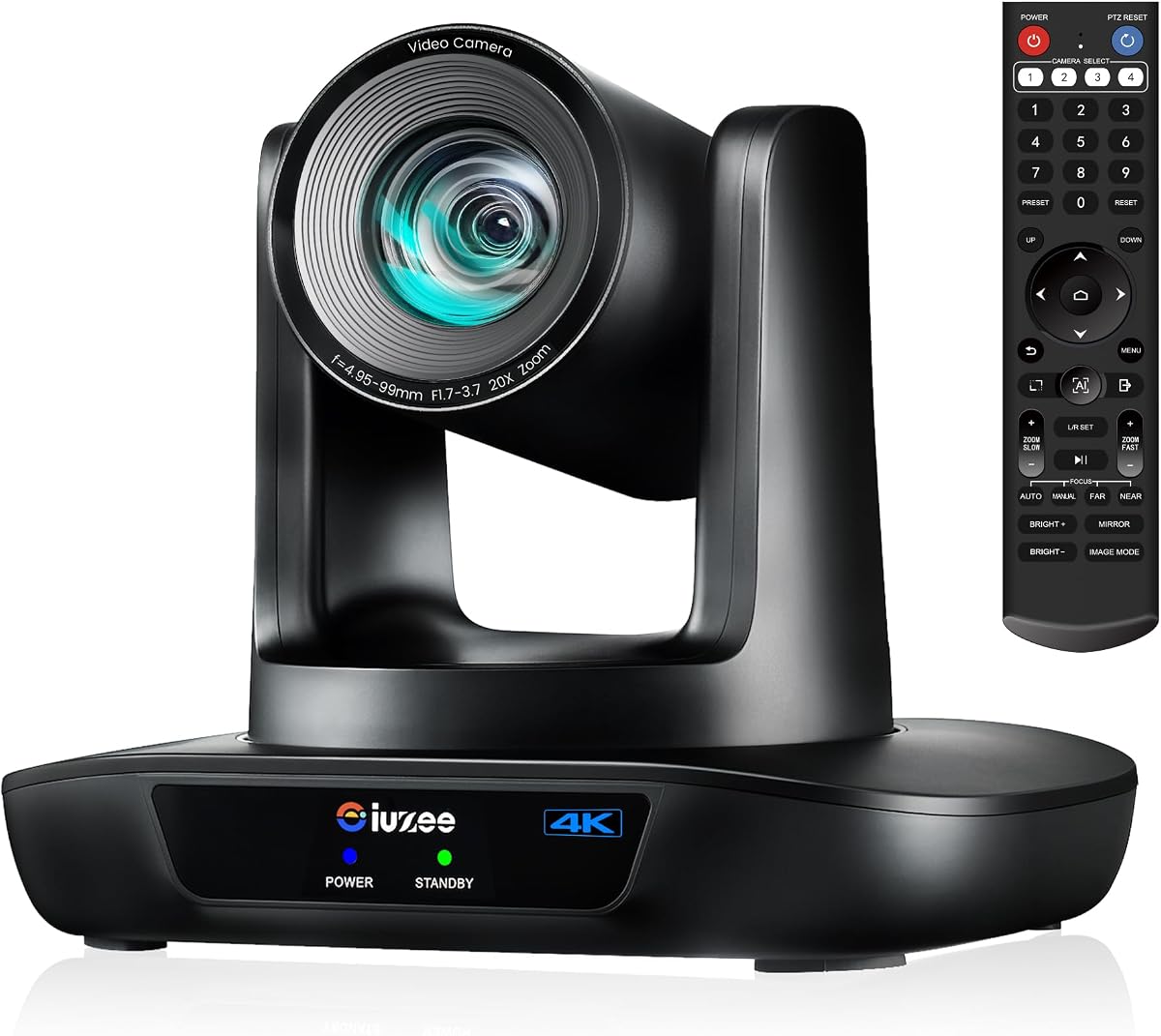
Designed for larger halls, this unit features a powerful 20x optical zoom. It captures distant speakers clearly without losing quality. PoE support simplifies cabling for professional installations.
We may earn a commission when you buy through this link, at no additional cost to you.
The audio system works well with large rooms providing clear voice pickup. Tracking remains consistent even when subjects move quickly. Users report excellent stability during long worship services.
Installation might need a PoE switch which adds to initial cost. The zoom is fantastic but requires a large room to utilize fully. The performance justifies the investment for big spaces.
Choose this for churches or large auditoriums needing long reach. It handles dynamic movement with ease. Ideal for productions where clear distant shots are required.
Power over Ethernet reduces cable clutter by combining data and power.
The 20x zoom allows close-ups of distant presenters without quality loss.
We may earn a commission when you buy through this link, at no additional cost to you.
This camera excels with IP streaming protocols like RTMP and RTSP. It allows direct streaming to platforms without extra software. The 20x zoom ensures detailed views for large events.
We may earn a commission when you buy through this link, at no additional cost to you.
Users appreciate the ability to set 255 presets for complex scenes. Tracking accuracy is high for fast movement. The image quality remains crisp under various lighting conditions.
It lacks a built-in mic requiring external audio solutions. The web browser interface is intuitive but needs initial configuration. For streaming pros, the output options are superior.
Pick this for broadcast style events requiring network streaming. It fits educational settings needing stable remote access. Ideal for YouTube or live stream productions.
Supports direct streaming to platforms like YouTube without extra hardware.
Advanced algorithms ensure accurate tracking even during quick movements.
We may earn a commission when you buy through this link, at no additional cost to you.
This unit is a powerhouse for professional live streaming environments. It includes an official NDI license for easy network video. SDI output supports long cable runs without signal loss.
We may earn a commission when you buy through this link, at no additional cost to you.
The tracking is highly accurate with facial recognition capabilities. Users praise the multi output flexibility for complex setups. It handles high demand streaming without lag or drops.
Setup requires some technical knowledge for SDI and NDI protocols. The price is higher but justified for studio quality results. It is built for robust production workflows.
Select this for professional studios or broadcast needs. It handles complex integrations smoothly. Ideal for high level live events requiring reliability.
Official NDI support allows high quality video over standard networks.
SDI outputs allow long cable runs for professional studio setups.
We may earn a commission when you buy through this link, at no additional cost to you.
This model balances cost and features effectively for various needs. It offers 4K resolution with a reliable zoom range. Connectivity is flexible with PoE and USB options.
We may earn a commission when you buy through this link, at no additional cost to you.
Users find it simple to set up for standard meetings. The build quality is robust for daily use. Tracking works well though it benefits from initial calibration.
The preset memory is smaller than top tier models. It still suffices for regular conference room use. The web interface is intuitive for quick adjustments.
Buy this for general office use or education. It avoids unnecessary complexity while delivering quality. Ideal for rooms needing reliability without premium features.
Supports multiple connection types to fit diverse network setups.
Web browser access allows easy control without installing software.
We may earn a commission when you buy through this link, at no additional cost to you.
Built for large spaces, this system integrates camera and audio fully. It captures everyone clearly without separate speakers. The AI framing keeps meetings centered automatically.
We may earn a commission when you buy through this link, at no additional cost to you.
Users value the clean setup with minimal cables. Sound is clear across large tables. It fits well into corporate boardroom environments.
The unit is heavier requiring secure mounting. Once installed it remains stable. It simplifies setup by combining multiple functions into one device.
Choose this for large corporate rooms needing simplicity. It works well for hybrid meetings. Ideal for teams requiring plug and play ease.
Combined audio and video hardware reduces clutter and setup time.
Designed to cover larger spaces effectively without repositioning.
We may earn a commission when you buy through this link, at no additional cost to you.
This webcam is perfect for small desks and personal use. It includes a speaker and mic for immediate use. The privacy cover adds security when idle.
We may earn a commission when you buy through this link, at no additional cost to you.
Users appreciate the adjustable field of view for solo or group shots. The 4K resolution is sharp for close calls. Tracking responds well to voice commands.
Zoom is digital which affects image quality at extremes. The audio range is best for personal desks. It fits laptops and desktops easily.
Select this for remote workers or small personal offices. It offers essential features without bulk. Ideal for home desks needing a quick setup.
Small footprint makes it perfect for laptop setups and small desks.
Includes a physical privacy cover to protect your camera when not in use.
We may earn a commission when you buy through this link, at no additional cost to you.
Selecting the right auto tracking conference camera requires understanding your room size and specific needs. This section breaks down key factors to ensure you get a system that delivers clear video and reliable performance.
Resolution determines how clear the video appears for remote participants. Look for at least 1080p at 60fps or 4K for detailed clarity. Higher resolution helps participants read text and see facial expressions better.
Prioritize cameras with higher resolution like 4K if details matter. Ensure your display hardware supports these standards.
Optical zoom maintains image quality when focusing on distant subjects. Digital zoom is convenient but can reduce sharpness. Consider how far you need to reach from the camera position.
For large rooms, a 20x optical zoom provides better results than digital alternatives. Check if the lens supports optical zoom before purchasing.
AI auto tracking uses face or body detection to follow speakers. Quality varies between models with some being more precise than others. Look for systems that can handle multiple people or specific presenters.
Choose cameras with robust tracking algorithms to avoid losing focus during movement. This feature is critical for dynamic meetings.
Audio is just as important as video for effective meetings. Some systems include built-in speakerphones while others require separate units. Ensure the microphone range covers your entire table.
Selecting a kit with high quality audio ensures clear communication. Look for noise cancellation to reduce distractions during calls.
Check what ports the camera supports such as USB HDMI or Ethernet. Some models offer Power over Ethernet (PoE) to simplify installation. Ensure compatibility with your existing conferencing software.
Flexibility in connections helps integrate the camera into your current setup. Verify USB 3.0 support for best performance.
The size of your meeting space dictates the camera needed. Small huddles need compact webcams while boardrooms require PTZ units. Consider ceiling or wall mounts for larger environments.
Match the camera's field of view and zoom to your room dimensions. This prevents distortion or missed participants.
Plug and play systems reduce IT setup time. Some cameras require software installation or complex configuration. Look for models with intuitive controls and remote options.
Simplicity is key for daily usage. Ensure staff can operate the system without training.
Reliable support ensures issues are resolved quickly. Look for warranties that cover hardware defects for at least two years. Responsive customer service adds value during setup.
Choose brands with strong support records. A good warranty protects your investment long term.
Begin by connecting the camera to your computer or network using the provided cables. USB connections are easiest for personal setups while Ethernet works best for offices. Ensure the camera is mounted securely at eye level.
Install any necessary drivers if the system requires them. Most modern cameras work instantly with plug and play support. Adjust the angle and zoom to capture the entire room before starting meetings.
Clean the lens regularly with a soft cloth to maintain image clarity. Keep the sensor area free of dust and fingerprints. Update firmware occasionally to ensure smooth tracking performance.
Optical zoom uses physical lenses to magnify the image without losing quality. Digital zoom crops and enlarges the image leading to lower resolution. For large rooms, optical zoom provides clearer results for distant speakers.
It depends on the model. Some kits include a Bluetooth speakerphone while others require external audio. Check the specifications to see if built-in mics are included before buying.
AI tracking uses face and body detection algorithms to follow movement. It analyzes video feeds to identify active speakers and adjusts the frame accordingly. This ensures participants stay in view without manual control.
Yes, most models support major platforms like Zoom and Microsoft Teams. They often use standard USB protocols that work automatically. Check for certification badges to ensure full compatibility.
PoE allows the camera to receive both data and power through one cable. This reduces clutter and simplifies installation in large rooms. It is useful for professional setups needing clean wiring.
Most modern cameras have decent low light performance but benefit from adequate room lighting. Check the specifications for low light capabilities if you often meet in dim rooms. Good lighting improves tracking accuracy.
Firmware updates are usually done via a web browser or manufacturer software. Connect the camera to the network and log into its admin panel. Download the latest version to keep features and security up to date.
A lens cover adds a layer of physical privacy when the camera is not in use. It is essential for offices sharing spaces or remote workers wanting visual security. Not all cameras include one so check before purchasing.
We reviewed ten top auto tracking conference cameras offering various features for every need. From budget webcams to premium broadcast units each model brings unique strengths to the table.
Prioritize resolution and zoom based on your room size. If audio quality is vital choose a system with a bundled speakerphone. Always check compatibility with your existing conferencing apps.
Prices change frequently so verify current listings before you buy. Choose a trusted brand with reliable support to ensure long term satisfaction. A right camera transforms how your team communicates.