
3DMAN 3D Touch Auto Bed Leveling Sensor
3.8Editor score
Hall effect sensor technology
Compatible with most bed materials
Simple RC servo integration
This guide compares the top bed leveling sensor for 3D printer models to help you choose the best auto leveling kit for your specific machine and budget needs.
Finding the right bed leveling sensor for 3D printer setups is crucial for consistent first layers and reliable print quality. Auto leveling kits eliminate manual adjustments by measuring bed height automatically.
We compared ten leading models based on compatibility, sensor type, ease of installation, and user feedback. Our analysis covers Creality CR Touch variants, BL Touch clones, and electronic tools for manual leveling.
Each pick highlights key strengths, weaknesses, and ideal use cases. Remember that availability and stock can change rapidly so verify current listings before purchasing your upgrade kit today.
3.8Editor score

4.6Editor score
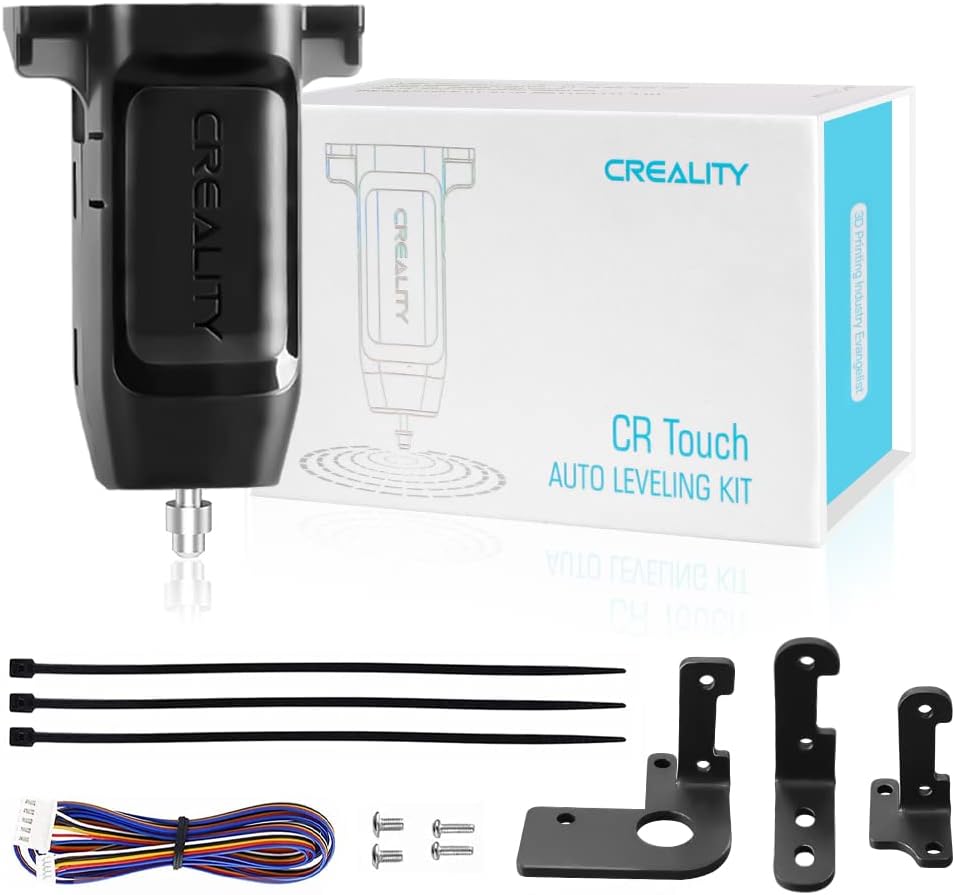
4.5Editor score
This side-by-side comparison lists all ten products with their key specifications to help you quickly identify the right sensor for your specific 3D printer model and requirements.


This official Creality CR Touch sensor earns our Editor's Choice for its professional design and high precision standards. It achieves positioning accuracy under 0.04mm making it ideal for detailed prints requiring tight tolerances.
We may earn a commission when you buy through this link, at no additional cost to you.
The combination of optical and metal probes increases service life while reducing errors caused by magnetic fields or temperature variations. With over 100000 reuse cycles it offers long-term reliability for frequent printing workflows.
While the lack of included brackets means you may need to source them separately the performance trade-offs are minimal. The sensor handles textured and glass beds effectively ensuring consistent adhesion across different materials.
Users seeking maximum reliability and precision for Ender 3 S1 Pro or V2 Neo printers should prioritize this kit. It is the top recommendation for those wanting stable leveling without compromising on build quality.
The upgraded metal probe design reduces wear and tear greatly prolonging service life for heavy users.
Multi-point detection builds a virtual plane to automatically compensate for tilt angles during printing.
We may earn a commission when you buy through this link, at no additional cost to you.
As our Best Budget pick this 3D Touch sensor offers a cost-effective entry into automatic leveling for common printers like Ender 3 V2. It uses Hall defect technology to detect contact points on the heated bed.
We may earn a commission when you buy through this link, at no additional cost to you.
The simple design incorporates an RC servo and micro switch which allows it to work with almost any control board. It adjusts Z-axis height during printing to compensate for platform unevenness effectively.
Users must handle the push pin carefully as hard pushing may reduce accuracy. However for those needing a basic solution without high costs it integrates well with glass wood or metal surfaces.
This model is ideal for beginners looking to try auto leveling without a major investment. It delivers core functionality at a price that makes upgrading accessible to all hobbyists.
Its simple control interface works with nearly any 3D printer control board without complex wiring.
The sensor detects points accurately across glass wood metal and other common bed materials.
We may earn a commission when you buy through this link, at no additional cost to you.
This official CR Touch kit stands out with premium support including a replacement probe in the package. It features a simple structure with high precision suitable for Ender 3 series with 32 Bit V4.2.2 or V4.2.7 mainboards.
We may earn a commission when you buy through this link, at no additional cost to you.
Installation is simplified as firmware updates are done via SD card without needing an ISP burner. This convenience saves time during setup and allows immediate testing after power on.
While limited to specific motherboard versions the multi-point detection builds a reliable virtual plane for compensation. The service life exceeds 100000 times ensuring long-term use for active print farms.
For owners of compatible Ender models seeking reliable official support this kit is the recommended premium choice. It balances ease of use with robust performance and after-sales service access.
The package includes a replacement probe and technical team contact for quick resolution of issues.
Firmware updates via SD card remove the need for external ISP burners during setup.
We may earn a commission when you buy through this link, at no additional cost to you.
This CR Touch variant offers reliable functionality for Ender 3 V2 Pro Ender 5 and CR 10 printers with 32 Bit V4.2.2 or V4.2.7 mainboards. It includes 3 mounting brackets to fit various printer frames.
We may earn a commission when you buy through this link, at no additional cost to you.
Installation follows the standard Creality procedure using an SD card to update firmware. This method is user-friendly and avoids the need for specialized hardware tools during setup.
While it shares the same core technology as official kits the compatibility remains restricted to specific motherboard versions. Users must confirm their board type to avoid purchasing an incompatible sensor.
For those with legacy Ender models this kit provides stable auto leveling without extra cost. It delivers solid performance for routine printing tasks with straightforward hardware integration.
The package includes 3 mounting brackets which simplifies mechanical setup for various printer models.
Updating via SD card is a familiar process for users already experienced with Creality firmware.
We may earn a commission when you buy through this link, at no additional cost to you.
This version of the CR Touch sensor supports newer models like Ender 3 V3 SE KE and S1 Plus. It is a critical upgrade for users moving to these recent printer generations needing auto leveling.
We may earn a commission when you buy through this link, at no additional cost to you.
The sensor maintains high precision with positioning accuracy under 0.04mm and reusable use cycles exceeding 100000. This reliability makes it suitable for continuous use in demanding print environments.
Note that brackets are not included which means users must check existing hardware or buy mounts separately. Installation requires following instructions but once set up it works well with various bed materials.
Users with Ender Neo or V3 series should choose this option to ensure compatibility. It delivers the same core benefits as older versions while fitting modern machine designs.
This kit specifically targets newer printers like Ender V3 KE and S1 Pro for current compatibility.
Independent research ensures stable function and long service life for frequent users.
We may earn a commission when you buy through this link, at no additional cost to you.
E-Leveler 2 is a manual electronic tool that provides visual feedback while adjusting the bed. It helps users achieve a perfectly level bed through its LED light system during setup.
We may earn a commission when you buy through this link, at no additional cost to you.
The new improved design features stronger battery holder and bed adjustment reminder arrows. This makes the leveling process easier and more consistent without needing advanced sensors.
It does not work for resin printers or delta printers which limits its applicability to FDM machines. However for those preferring manual control this tool simplifies the calibration process significantly.
Users seeking an affordable visual aid for bed leveling should consider this device. It complements manual setups without requiring firmware updates or complex integration.
The LED light indicates when the bed is level aiding visual calibration accuracy.
Compatible with all manually adjustable print beds excluding resin and delta models.
We may earn a commission when you buy through this link, at no additional cost to you.
This Geeetech upgrade kit supports both 8 and 32 Bit motherboards which increases compatibility with older printers. It includes 4 mounting brackets and 2 different length cables for wiring flexibility.
We may earn a commission when you buy through this link, at no additional cost to you.
The sensor is controlled by Hall effect technology offering high precision. Its structure deviation in repeatability is around 0.003mm ensuring consistent detection across multiple tests.
If a problem is found during self-test the LED blinks to indicate issues. Users should follow instructions carefully to avoid pin damage and ensure proper calibration.
Printers with older 8 bit boards benefit most from this adapter. It is a solid choice for those needing broad hardware compatibility without purchasing newer boards.
The kit includes an adapter pinboard allowing use on various motherboard types.
Two cable lengths ensure enough slack for different printer interface distances.
We may earn a commission when you buy through this link, at no additional cost to you.
The MKS 3D Touch V2.0 aims to improve printing precision by measuring surface tilt. It adjusts Z-axis height during printing to compensate for any detected unevenness.
We may earn a commission when you buy through this link, at no additional cost to you.
Its structure uses a solenoid and Hall sensor to integrate high precision in a simple design. The device works with glass wood metal beds making it versatile for different users.
Users must avoid hard pushing on the push pin to prevent damage and loss of accuracy. This requires gentle handling during installation and initial calibration checks.
For owners of CR-10S or Ender 3 looking to boost precision this sensor offers a practical path. It delivers core leveling functions compatible with many popular 3D printers.
This sensor greatly improves printing precision by correcting bed tilt automatically during prints.
Works with nearly any bed material including glass wood and metals.
We may earn a commission when you buy through this link, at no additional cost to you.
This Official Creality kit offers consistent performance for Ender 3 V2 Pro and Max printers with V4.2.2 V4.2.7 motherboards. It includes 3 mounting brackets and features a metal probe upgrade.
We may earn a commission when you buy through this link, at no additional cost to you.
The metal probe reduces wear and tear prolonging service life significantly. With over 100000 reuse cycles it provides stable quality for regular printing needs.
Firmware updates are done via SD card without ISP burners for convenience. However compatibility is restricted to specific boards so users must verify their version first.
For those needing a reliable kit for older Ender models this is a solid choice. It delivers consistent results with standard Creality support and easy setup.
The upgraded metal probe reduces wear and tear and greatly prolongs service life.
Builds a virtual plane to compensate for tilt at different points.
We may earn a commission when you buy through this link, at no additional cost to you.
This kit is developed by the Creality 3D research institute based on user data. It is stable and cost-effective compared to traditional automatic leveling options available.
We may earn a commission when you buy through this link, at no additional cost to you.
The system uses multi-point detection to build a virtual plane compensating for tilt. This allows consistent results across different points on the print bed.
Users must verify motherboard version V4.2.2 or V4.2.7 before purchasing. Firmware updates are required to enable full sensor functionality after installation.
For owners of Ender 3 V2 and Ender 5 this provides reliable auto leveling. It is a practical upgrade for consistent first layers without major costs.
Independent research and development ensures stable function and long service life.
Records height of each point to compensate for tilt angles.
We may earn a commission when you buy through this link, at no additional cost to you.
Choosing the right sensor involves checking compatibility motherboard type and sensor technology. This guide covers key factors to help you select the best fit for your printer.
Verify that your printer model is supported by the sensor kit. Many CR Touch variants work only with Ender 3 V2 Ender 5 or specific CR10 series models. Using a sensor on unsupported machines may require complex modifications.
Always check the product description for listed compatible printers before purchasing.
Many auto leveling sensors require specific 32-bit motherboards such as V4.2.2 or V4.2.7. Older 8-bit boards may need adapters or different sensors like BL Touch variants.
Check your motherboard type in printer settings to ensure the sensor will integrate properly.
Some kits include 3 or 4 mounting brackets which simplify installation. Others may require you to source brackets separately for your printer frame.
Confirm whether brackets are included to avoid delays during setup.
Hall effect sensors use magnetic detection while optical sensors use light to detect contact. Metal probes with optical sensors offer better resistance to magnetic fields and temperature changes.
Choose technology that suits your printer environment and bed material.
Ensure the sensor works with your bed material such as PEI sticker glass or metal. Most modern sensors are compatible but older models may have limitations.
Compatible bed support ensures accurate detection during every print cycle.
Auto leveling sensors often require firmware updates via SD card. Some kits support updates without ISP burners which simplifies the process.
Prepare your SD card and download the correct firmware before starting installation.
Look for sensors rated for 100000 cycles or more to ensure long-term reliability. Probes made of metal last longer than plastic components in frequent use.
Higher durability reduces maintenance needs over time.
Positioning accuracy affects print quality. Sensors with accuracy under 0.04mm deliver more consistent first layers.
Prioritize higher accuracy if you print small detailed parts regularly.
Install the sensor by mounting it securely to the nozzle or print head bracket. Follow the guide to align the probe correctly with your bed height.
Update firmware via SD card before powering on the printer. This enables the sensor to communicate with your board properly.
Avoid hard pushing on the probe pin during manual tests to prevent damage. Regularly check calibration accuracy to maintain consistent print quality.
No most sensors are designed for specific printer models or motherboard versions. Always verify compatibility with your printer model and board type before purchasing.
Yes most auto leveling sensors require firmware updates to enable sensor data integration. Download the correct firmware for your motherboard from the manufacturer website.
Unsupported motherboards may not recognize the sensor data. You might need to upgrade to a compatible board or use a sensor designed for older boards.
Most modern sensors work with glass PEI or metal beds. Confirm bed material compatibility in the product description before installation.
Calibrate after installation and whenever print adhesion changes. Regular checks ensure consistent first layers and reduce failed prints.
Some premium kits include replacement probes while others do not. Check the package contents to determine if spare parts are available.
Hall sensors can be affected by magnetic interference though newer versions resist this well. Optical sensors may offer better stability in high temperature environments.
Auto leveling compensates for bed tilt but initial leveling is still needed. It greatly reduces manual adjustments but does not replace initial setup.
The Creality CR Touch variants offer reliable precision for Ender and CR10 models with specific boards. Manual tools like E-Leveler provide alternatives for those preferring visual calibration.
Prioritize compatibility motherboard type and service life when making your decision. Selecting the right sensor improves consistency and reduces frustration.
Always verify current listings for brackets and updates before purchasing. Prices availability and compatibility may change so confirm details before finalizing your order.