
NetumScan USB 1D Barcode Scanner
4.4Editor score
Wired USB connection for stability
Ergonomic anti-shock design
Supports multiple 1D barcode types
This guide compares the top ten barcode scanners for library use based on connectivity, battery life, durability, and scanning accuracy to help you choose the
Libraries require efficient tools to manage vast collections of books and materials. A reliable barcode scanner for library tasks ensures quick check-ins and check-outs for patrons and staff alike. Choosing the right device depends on specific needs like wireless range and battery longevity.
We have evaluated ten leading barcode scanner models suitable for library environments. Our analysis focuses on connection types, scanning speed, and durability against daily wear. Each product offers unique features that cater to different library sizes and operational workflows.
Each section below details a specific model with its key specifications and benefits. You will find pros, cons, and detailed usage notes to inform your decision. Please note that product availability and pricing may change over time.
4.4Editor score

4.4Editor score

4.3Editor score
The following table provides a side-by-side comparison of all ten products reviewed in this guide. It highlights key specifications to help you quickly identify the model that best fits your library's operational requirements and budget constraints.




The NETUM Bluetooth Barcode Scanner stands out as a top choice for library environments due to its robust connectivity options. With a 4.4 rating, it offers reliable performance for daily check-in and check-out tasks. Its high-resolution CCD sensor ensures accurate reading of book barcodes.
We may earn a commission when you buy through this link, at no additional cost to you.
One of its key strengths is the extensive battery life, providing up to 200,000 scans on a single charge. This reduces downtime significantly for library staff. The ability to store up to 100,000 barcodes in offline mode is crucial for areas with poor connectivity.
While it is a strong performer, it does not support certain POS systems like Square or DoorDash. Users must also scan specific configuration barcodes from the manual to set preferences. These trade-offs are acceptable for most standard library workflows.
Librarians seeking a versatile wireless solution should consider this model. Its compatibility with Windows, Mac, and iOS makes it a flexible choice. The combination of wireless freedom and wired backup makes it an excellent all-around option.
This scanner supports Bluetooth, 2.4G wireless, and wired modes allowing seamless switching based on availability.
The storage mode allows users to scan and save data even when out of range of a computer.
We may earn a commission when you buy through this link, at no additional cost to you.
The NetumScan USB 1D Barcode Scanner is an excellent entry point for libraries on a tight budget. It holds a strong 4.4 rating and provides essential functionality without unnecessary complexity. The wired connection ensures consistent performance without battery worries.
We may earn a commission when you buy through this link, at no additional cost to you.
Its durability is a major plus, designed to withstand drops from significant heights. This ruggedness is ideal for busy circulation desks where equipment might be handled roughly. The CCD sensor captures barcodes from paper and screens with high accuracy.
However, the lack of wireless connectivity means the user is tethered to the computer. This limits movement during inventory checks across the stacks. For fixed station use, this limitation is minor compared to the cost savings.
Small libraries or home libraries will find this device sufficient for their needs. It supports a wide range of standard 1D barcodes including ISBN. The simple setup process allows for immediate use without technical hurdles.
The scanner is built to withstand drops from up to two meters ensuring longevity in busy environments.
It requires no additional software installation making it ready to use as soon as plugged in.
We may earn a commission when you buy through this link, at no additional cost to you.
The Tera Barcode Scanner with Screen offers a premium experience with its unique interface capabilities. With a 4.3 rating, it appeals to users who want more control over device settings. The display allows for easy adjustments without needing a computer.
We may earn a commission when you buy through this link, at no additional cost to you.
Supporting both 1D and 2D QR codes makes it future-proof for digital materials. The inclusion of a charging cradle adds convenience by keeping the device powered when not in use. It supports multiple connection types for maximum flexibility.
The added features do increase the weight compared to smaller models. It is also priced higher than basic wired options. These factors are worth considering if the extra functionality is needed for specific library applications.
Libraries requiring 2D scanning capabilities will appreciate the advanced CMOS imaging. The ability to view stored barcodes directly on the scanner is a useful feature. It serves well as a high-end tool for diverse inventory tasks.
Adjust language and volume directly on the scanner screen without needing external software tools.
The CMOS sensor can read challenging barcodes including those on reflective surfaces or driver's licenses.
We may earn a commission when you buy through this link, at no additional cost to you.
The Eyoyo Mini 1D Bluetooth Barcode Scanner is designed for portability above all else. Weighing only 35 grams it is incredibly easy to hold during extended scanning sessions. Its 4.3 rating reflects its reliability for specific handheld tasks.
We may earn a commission when you buy through this link, at no additional cost to you.
It offers three connection modes ensuring compatibility with almost any device setup. The long battery life means users can work for days without recharging. The vibration mode is a thoughtful addition for quiet library environments.
The main limitation is the inability to scan codes from screens. This restricts its use for checking digital assets. However for physical book scanning this feature is often unnecessary. The trade-off is acceptable for the weight savings.
Staff members who walk through aisles will benefit from the lightweight form factor. The vibration feedback ensures silent operation which is crucial in study areas. It is an ideal supplement to more robust fixed scanners.
At just 35 grams this scanner reduces hand fatigue during long inventory or cataloging sessions.
Users can switch to vibration mode to scan quietly without disturbing patrons studying nearby.
We may earn a commission when you buy through this link, at no additional cost to you.
The Tera Barcode Scanner with Battery Indicator offers practical features for daily operations. With a high 4.5 rating it is known for reliability. The visual battery indicator removes the guesswork of knowing when to charge the device.
We may earn a commission when you buy through this link, at no additional cost to you.
Its wireless range extends significantly allowing freedom of movement within the library. The IP54 protection ensures it can withstand dust which is common in storage areas. The curved handle provides a comfortable grip for repetitive use.
While it is robust it does not read 2D codes. Users looking for QR code support will need to look elsewhere. For standard book barcodes however it performs exceptionally well. The trade-off is minimal for many library workflows.
This model is great for larger facilities where mobility is key. The durable build ensures it lasts through rigorous daily handling. It is a solid middle ground between budget and premium options.
A built-in indicator light shows remaining power to prevent unexpected shutdowns during work.
The anti-shock silicone cover and IP54 rating protect against drops and dust accumulation.
We may earn a commission when you buy through this link, at no additional cost to you.
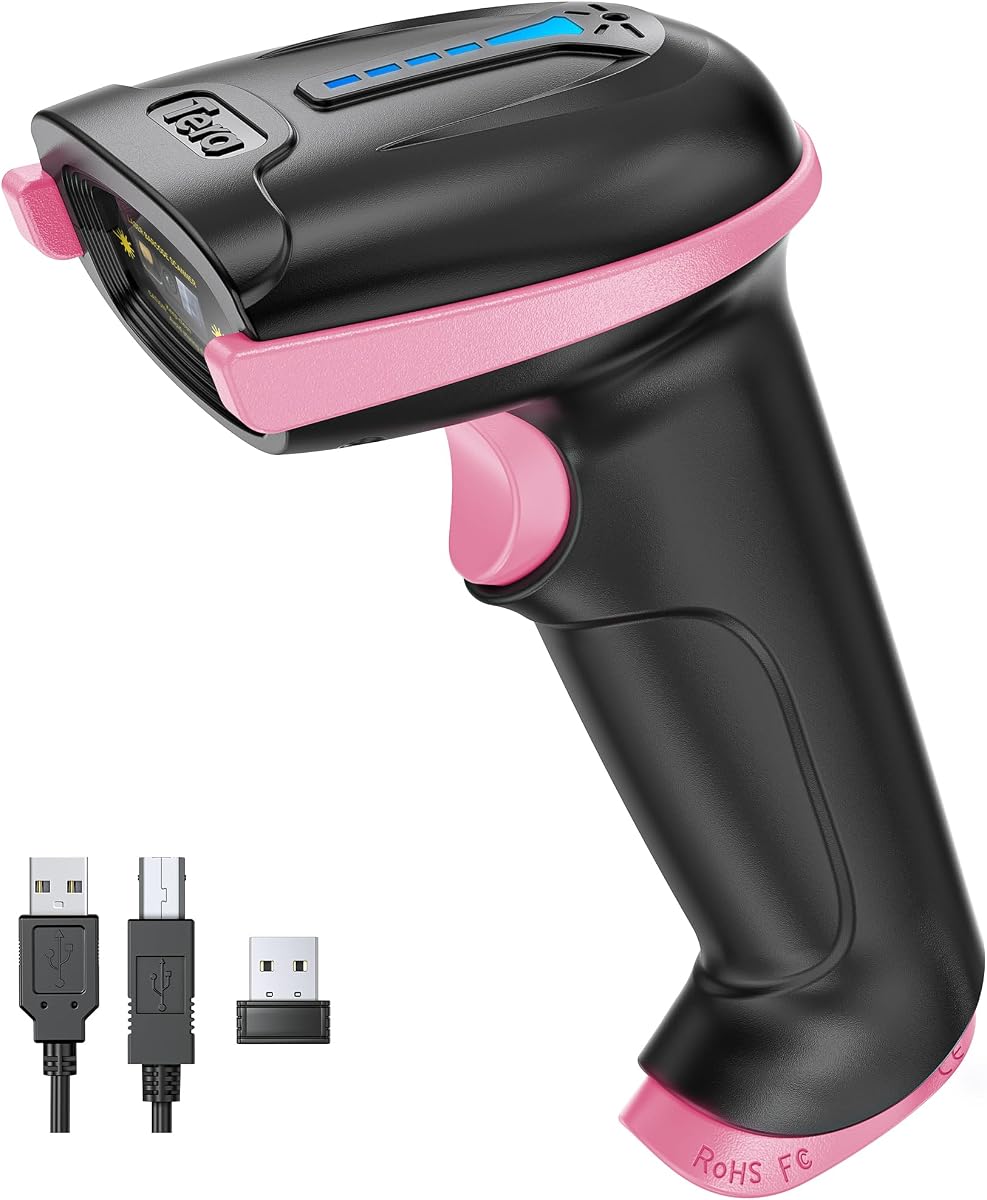
The Pink variant of the Tera Barcode Scanner offers the same reliable performance as its counterparts. It maintains a strong 4.5 rating and brings a splash of color to the workspace. The technical specifications match the other versions perfectly.
We may earn a commission when you buy through this link, at no additional cost to you.
The wireless range and battery indicator are key features for operational efficiency. Users can move freely without worrying about being tethered to a desk. The protective design ensures longevity in active environments.
Like the standard version it does not support 2D scanning. This is a consistent limitation across this model line. For standard library inventory tasks it remains highly effective. The color choice allows for personal preference.
This option is suitable for libraries that want equipment that stands out. It provides the same utility as other models but with a unique aesthetic. It is a practical choice for staff who value design.
The pink color allows libraries to color code their equipment or simply add visual interest.
Wireless freedom and battery visibility streamline daily checkout and inventory processes.
We may earn a commission when you buy through this link, at no additional cost to you.
The WoneNice USB Laser Barcode Scanner is optimized for speed and efficiency. With a 4.5 rating it delivers rapid scanning performance. The laser technology is well suited for reading standard printed barcodes on books.
We may earn a commission when you buy through this link, at no additional cost to you.
It supports a wide range of angles making it easy to find the right position. The compatibility with common software ensures it integrates well into existing library systems. The setup process is straightforward and quick.
A limitation of laser technology is the inability to scan from screens. This restricts its use for digital inventory. For physical books however it is very effective. The wired connection ensures stable data transfer.
This scanner is ideal for high volume checkout desks. The speed reduces wait times for patrons. It is a reliable workhorse for any library needing fast and accurate scanning capabilities.
Capable of up to 200 scans per second reducing checkout time significantly.
Inclination and elevation angles allow for easy scanning in various positions.
We may earn a commission when you buy through this link, at no additional cost to you.
The Symcode Wireless Barcode Scanner offers an impressive transmission range for library environments. With a 4.4 rating it is trusted for reliable wireless performance. The long range allows staff to move throughout the building freely.
We may earn a commission when you buy through this link, at no additional cost to you.
It supports network mode which enables multiple scanners to connect to a single receiver. This is useful for large inventory projects involving several staff members. The battery life is substantial allowing for extended shifts without charging.
Like many laser scanners it does not support 2D codes. This is a limitation for modern QR usage. However for traditional barcodes it performs very well. The flexibility of wired or wireless use adds value.
Large libraries will benefit from the extensive wireless range. The ability to work without cables is essential for stocktaking. It is a robust solution for teams needing to cover large areas efficiently.
Multiple devices can transmit to one receiver enabling team inventory work simultaneously.
Up to 400 meters in open air allows coverage of large floor spaces without dead zones.
We may earn a commission when you buy through this link, at no additional cost to you.
The Pink Portable Mini 1D Bluetooth Barcode Scanner combines utility with style. It holds a 4.3 rating and appeals to users looking for a compact device. The design is tailored for portability and ease of use.
We may earn a commission when you buy through this link, at no additional cost to you.
It supports multiple connection modes ensuring it works with various devices. The battery provides enough power for regular daily use. The lightweight design reduces strain during extended handheld tasks.
The battery capacity is smaller than some larger models. It may need charging more frequently under heavy load. However for typical library tasks it is sufficient. The color offers a unique visual appeal.
This scanner is great for personal or small business library use. It is easy to carry and store in a pocket. Staff who prefer a stylish tool will appreciate this option.
The small form factor fits easily in a pocket for quick access during walks.
Supports Bluetooth 2.4G and wired modes for maximum compatibility with devices.
We may earn a commission when you buy through this link, at no additional cost to you.
The Barcode Scanner with Stand is unique for its hands-free scanning capability. It holds a 4.0 rating and offers a practical solution for busy checkouts. The included stand allows for auto-sensing without holding the device.
We may earn a commission when you buy through this link, at no additional cost to you.
It supports both 1D and 2D codes offering more versatility than laser models. The adjustable stand ensures the scanner is positioned correctly for accurate reads. This design is ideal for fixed checkout counters.
The wired connection restricts movement but ensures a stable link. While the rating is slightly lower it remains a useful tool for specific use cases. The auto-sensing feature speeds up transactions.
Libraries with high traffic desks will appreciate the convenience of hands-free scanning. It reduces physical strain on staff. The ability to read QR codes adds value for digital access points.
The auto-sensing mode allows scanning without holding the device reducing operator fatigue.
An adjustable stand keeps the scanner steady and at the optimal angle for reading.
We may earn a commission when you buy through this link, at no additional cost to you.
Selecting the right barcode scanner for a library requires careful consideration of technical and operational needs. This guide outlines the essential factors to evaluate before making a purchase decision.
Libraries often require flexible connectivity to integrate with different systems. Choose between wired, wireless, or hybrid models based on your workflow. Wireless options provide mobility while wired ones ensure stability.
Prioritize models with multiple connection modes to adapt to varying setups.
A long-lasting battery is crucial for uninterrupted library operations. Look for scanners with high capacity batteries that last through shifts. Frequent charging can disrupt workflow and reduce productivity.
Opt for models with clear battery indicators to avoid unexpected downtime.
Accurate reading of barcodes is fundamental to inventory management. Ensure the scanner can read damaged or worn codes commonly found in books. High resolution sensors improve success rates with difficult codes.
Check specifications for sensor type to ensure reliable performance.
Library equipment often faces rough handling and environmental factors. Choose devices with drop resistance and dust protection to ensure longevity. Rugged designs reduce replacement costs over time.
Look for anti-shock materials and protective coatings for better durability.
Most libraries use 1D barcodes but 2D support may be needed for future needs. Verify that the scanner supports standard ISBN codes and potentially QR codes. Limited support can restrict usability for new media.
Confirm code compatibility before purchasing to avoid limitations.
Ensure the scanner works with your existing library management software. Compatibility with Windows, Mac, and Linux is common but check specifically. Drivers or configuration may vary by platform.
Check system requirements to ensure seamless integration with your library.
Comfortable designs reduce fatigue during long scanning sessions. Look for ergonomic handles and lightweight builds for handheld use. The weight and grip affect user experience significantly.
Select models that fit the hands well to improve staff comfort.
Evaluate the cost against the features offered for overall value. Basic models may suffice for simple tasks while advanced ones offer more. Consider long-term savings from durability and battery efficiency.
Balance your budget with the required features for optimal value.
Begin by connecting the scanner to your computer via the recommended method. If using wireless, pair the device with the receiver. Install any necessary drivers if prompted by your system.
Test the scanner with a known barcode to ensure proper operation. Configure settings such as language or suffix if needed using the manual. Adjust the volume to suit your environment.
Clean the lens regularly with a soft cloth to prevent dust buildup. Store the scanner in a dry place to maintain battery health. Recharge when the indicator light signals low power.
Libraries primarily use 1D barcodes like ISBN and EAN for books. Some modern systems may incorporate 2D QR codes for digital content. Ensure your scanner supports these formats for compatibility.
Most scanners require a host device like a PC or tablet to function. Some models have storage modes to save data temporarily. However real-time use usually requires a connection to a system.
Battery life varies by model but can range from a few hours to weeks. Some high capacity units allow for months of standby time. Check specific specs for expected usage duration.
Wireless scanners offer better mobility across large spaces compared to wired ones. They eliminate cable clutter and allow staff to move freely. However ensure the range covers your entire facility.
Most modern scanners are plug and play and do not require drivers. They often present as keyboard devices to the system. However check compatibility with your specific OS.
Many models are designed with drop resistance to withstand impacts. However repeated drops may still cause internal damage over time. Use protective cases to extend the device lifespan.
CCD and camera-based scanners can often read codes from screens. Laser scanners typically cannot read from screens due to technology limits. Check the sensor type before assuming screen compatibility.
Settings are often changed by scanning specific configuration barcodes. Manuals usually provide these codes for prefixes or modes. Some devices offer screen menus for easier configuration.
We have reviewed ten top barcode scanners suitable for various library needs. From wireless versatile models to budget-friendly wired options there is a choice for every scenario. Consider your specific requirements before deciding.
Prioritize factors like battery life and durability to ensure long-term value. The best choice depends on your workflow and budget constraints. Invest in a device that matches your daily operations.
Please check current availability and pricing as they may vary over time. We hope this guide helps you find the perfect tool for your library.