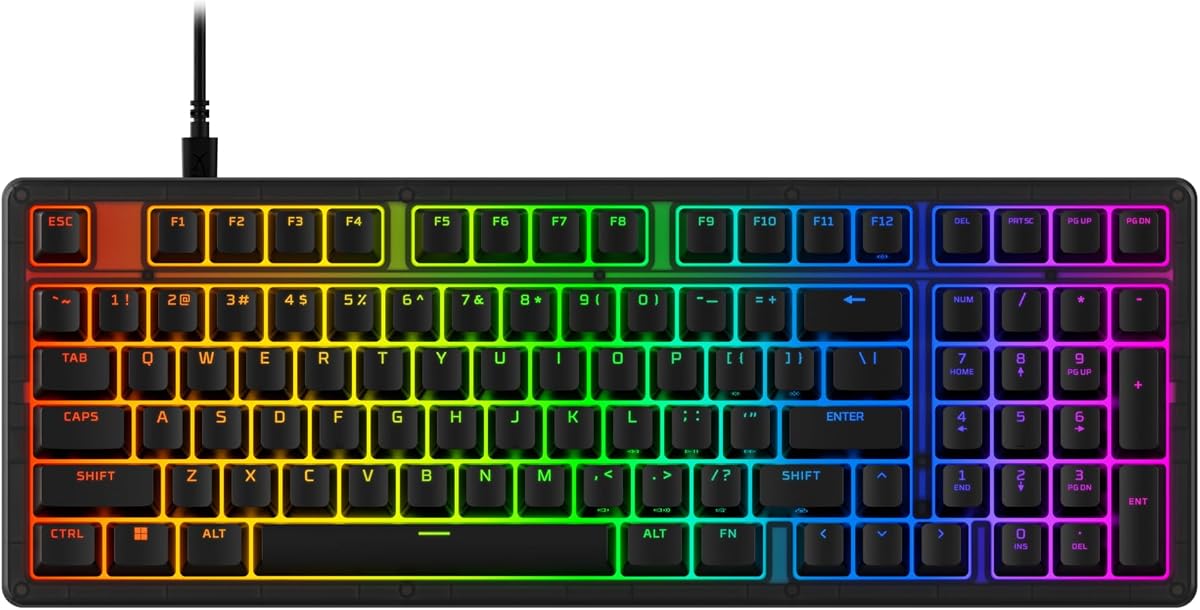
HyperX Eve 1800
4.6Editor score
Ten zone RGB lighting
Dedicated media buttons
Compact full size layout
Finding the right 1800 compact keyboard can transform your workspace by saving valuable desk space without sacrificing functionality. These boards offer a full numpad in a tighter footprint than standard full-size models. Whether you need this for gaming or work, the layout strikes a smart balance between efficiency and ergonomics.
We have carefully evaluated ten leading models available in the current market to bring you this curated selection. Our analysis focuses on build quality, switch types, connectivity options, and overall user satisfaction. This list covers diverse needs ranging from industrial durability to premium wireless gaming experiences.
Each pick below highlights specific strengths and ideal use cases to guide your decision-making process effectively. Remember that product availability and pricing can fluctuate frequently based on market demand and retailer promotions. Always check the latest offers before finalizing your purchase to ensure you get the best value available today.
4.6Editor score

4.6Editor score

4.4Editor score
As an Amazon Associate we earn from qualifying purchases.
This side by side comparison breaks down the key specifications and unique selling points of every model on our list to help you see the differences at a glance.


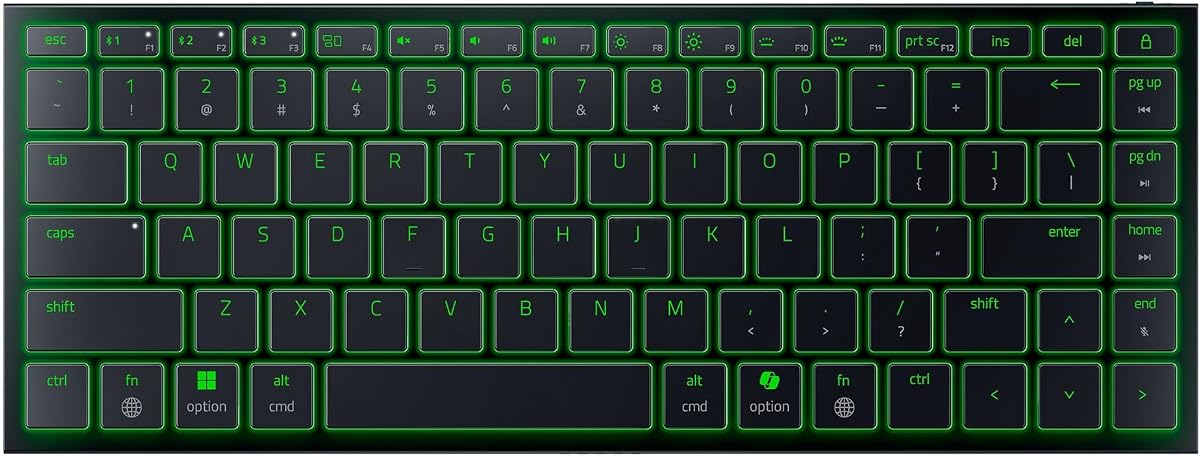


The HyperX Origins 2 1800 stands out as a top choice for enthusiasts who value customization and performance. It combines a compact 1800 layout with mechanical switches and modern features like an 8k polling rate. This board is designed to give you full control over your typing experience without sacrificing desk space.
We may earn a commission when you buy through this link, at no additional cost to you.
One of its greatest strengths is the hotswap capability, allowing you to change switches and keycaps without soldering. The O ring mount and removable silicon weight help dampen noise and reduce wobble for a premium feel. Additionally the high profile design elevates the keys for easier engagement while typing long documents.
While it lacks wireless connectivity which might be a downside for some users the wired performance is exceptional. The included HyperX NGENUITY software lets you tailor lighting and macros precisely. These tradeoffs are acceptable given the level of control and speed it offers gamers and power users alike.
If you want a keyboard that can grow with your preferences and delivers high speed input this is the model to get. It is ideal for those who prioritize mechanical feedback and want a board that looks unique on their desk setup.
The 5 pin hotswap sockets let you upgrade your tactile feel instantly with just a simple tool pull.
An 8k polling rate ensures your keystrokes are registered up to 8000 times per second for zero lag.
We may earn a commission when you buy through this link, at no additional cost to you.
The HyperX Eve 1800 delivers excellent value for those seeking a compact layout without breaking the bank. It features a full size numpad in a tighter frame which frees up room for your mouse and accessories. The membrane switches provide cushioned feedback suitable for long sessions of typing or gaming.
We may earn a commission when you buy through this link, at no additional cost to you.
Customization is a key focus with ten zones of RGB lighting that sync with your gaming setup. Dedicated media buttons allow quick control over volume and profiles without interrupting your workflow. The anti ghosting and twelve key rollover ensure reliable performance even during intense gameplay moments.
While it does not offer the tactile precision of mechanical switches it remains a solid choice for casual users. The software support allows for macro creation and lighting adjustments to personalize your experience. This makes it a versatile option for home offices or budget gaming setups.
Choose this keyboard if you need a functional compact layout with nice lighting effects at a very accessible price. It is perfect for users who want extra desk space but do not want to invest heavily in mechanical technology.
The condensed layout gives you extra space to move your mouse freely during intense gaming sessions.
Push a dedicated button to adjust volume or switch profiles instantly without pausing your activity.
We may earn a commission when you buy through this link, at no additional cost to you.
The Logitech Alto Keys K98M brings a premium mechanical experience to a compact 1800 style layout with wireless convenience. It uses a gasket mount design to absorb vibrations for satisfying keystrokes that feel great during long work or gaming sessions. The nine eight key layout keeps a numpad while saving space.
We may earn a commission when you buy through this link, at no additional cost to you.
Hotswappable Marble switches offer smooth and stable typing with concave keys that guide your fingers. You can pair this keyboard with multiple devices via Bluetooth or Logi Bolt and switch between them easily. The battery life is impressive offering up to twelve months on a single charge with USB C recharging available.
Although it lacks RGB lighting the white backlight provides ample visibility in low light environments. The transparent top case and vibrant colors make it a stylish addition to any modern desk. It is a strong choice for professionals who value comfort and seamless connectivity over flashy lights.
This keyboard is ideal for users who need a reliable wireless mechanical board for productivity and style. If you prioritize comfort and the ability to switch between devices effortlessly this model stands out as a top contender.
The gasket mount reduces harsh vibrations to deliver a comfortable typing experience all day long.
Enjoy up to twelve months of wireless use on a single charge so you forget about charging often.
We may earn a commission when you buy through this link, at no additional cost to you.
The Cherry G80-1800 is built specifically for industrial applications where reliability and longevity are critical. It features Cherry MX Black switches that provide a powerful and direct typing feel without any click sound. The compact dimensions make it ideal for tight spaces and 19 inch rack mounted applications.
We may earn a commission when you buy through this link, at no additional cost to you.
Gold crosspoint contacts ensure long lasting switching performance that can withstand over one hundred million actuations per key. It supports Codeset 3 with a PS2 adapter allowing flexibility for Unix computers and older systems. The wired connection ensures stable performance without worrying about battery life or interference.
While it lacks modern features like RGB lighting the robust build quality speaks for itself. The high quality mechanical switches are rated for heavy continuous use in demanding environments. This keyboard is designed to work hard without failing when reliability matters most.
Choose this keyboard for industrial settings or legacy systems that require a dependable and compact mechanical solution. It is perfect for users who need a keyboard that can handle continuous operation in tough conditions without issues.
Designed for continuous use with contacts that ensure reliable performance even in demanding environments.
Approx fifteen inches width fits perfectly in tight spaces or 19 inch application racks easily.
We may earn a commission when you buy through this link, at no additional cost to you.
This model belongs to the Cherry G80 series known for meeting high standards in industrial environments. It offers a compact mechanical keyboard solution with both USB and PS2 interfaces for maximum compatibility across different systems. The build quality is designed to withstand heavy use in point of sale or industrial settings.
We may earn a commission when you buy through this link, at no additional cost to you.
Cherry manufactures these keyboards to meet ISO standards ensuring consistent quality and safety. The compact dimensions save space while maintaining a standard layout for easy user adaptation. Mechanical keyswitches provide reliable feedback that is essential for frequent input tasks.
While it may not have extra features like RGB lighting its focus is on performance and durability. The versatile connectivity options mean it can be integrated into many different types of systems. It is a solid choice for businesses needing a reliable input device.
Opt for this keyboard if you need a certified industrial grade input device for professional or commercial use. It is ideal for environments where reliability and standard compliance are more important than aesthetic features.
Meets international organization for standardization standards for quality and safety in industrial use.
Works with both USB and PS2 interfaces to ensure compatibility with a wide range of systems.
We may earn a commission when you buy through this link, at no additional cost to you.
The Razer Joro Wireless packs a function row and arrow keys into a hyper slim portable design. It features ultra low profile switches that minimize strain and provide quick actuation for gaming and work. The compact layout is perfect for travelers who need a quality mechanical feel on the go.
We may earn a commission when you buy through this link, at no additional cost to you.
With Razer Chroma RGB you can personalize your keyboard with millions of colors and dynamic effects. It supports Bluetooth 5.0 pairing up to three devices allowing you to switch setups instantly with shortcuts. The Snap Tap feature prioritizes inputs between two keys for faster directional changes in games.
While it does not have a number pad the design focuses on portability and essential gaming features. The long lasting battery life ensures you can work or play longer before needing to recharge. It balances size and performance well for mobile gamers.
Choose this keyboard if you want a compact wireless gaming experience that fits easily in a bag. It is ideal for users who prioritize mobility and need a keyboard that performs well during travel or work.
Just over three hundred grams and sixteen millimeters thin makes it easy to carry anywhere daily.
Snap Tap feature allows prioritizing inputs between two keys without releasing the previous one.
We may earn a commission when you buy through this link, at no additional cost to you.
This keyboard is part of the G80 compact industrial line designed for demanding environments. It includes all 104 keys in a space saving and ergonomic form factor suitable for various workstations. The gold crosspoint contacts provide reliable switching performance that lasts for years of use.
We may earn a commission when you buy through this link, at no additional cost to you.
Codeset 3 support via PS2 connection makes it useful for Unix computers and legacy systems. The high quality build ensures outstanding performance even when facing high demands. It is a robust option for users who need a keyboard that simply works without interruption.
While it lacks modern RGB or wireless options its reliability is its strongest feature. The compact design keeps your mouse and keyboard close for a more natural ergonomic position. It is a practical choice for industrial or server room setups.
Select this keyboard if you need a durable mechanical solution for older systems or industrial tasks. It is ideal for users who prioritize long service life and compatibility with legacy hardware.
Supports Codeset 3 with PS2 connection for use on Unix computers and legacy systems.
Extremely high service life of individual keys ensures it withstands demanding use over time.
We may earn a commission when you buy through this link, at no additional cost to you.
The Cherry Stream Wired keyboard is a flat and reliable choice for those who value quiet operation. It removes the number pad to bring your mouse closer to you for a more natural ergonomic position. CHERRY SX scissor technology ensures precise pressure points for a comfortable typing experience.
We may earn a commission when you buy through this link, at no additional cost to you.
It includes practical multimedia keys for quick access to common functions without interrupting your flow. The abrasion resistant lettering remains legible even after long use in high traffic environments. It is a non slip and sturdy design with an integrated metal plate for stability.
While it lacks a numpad the space saving design is a benefit for small workspaces. The whisper quiet performance makes it suitable for shared offices or home environments where noise is a concern. It is a practical tool for frequent typists.
Choose this keyboard if you need a quiet and durable wired option for daily productivity. It is ideal for users who want a compact layout that promotes better ergonomics and less noise.
Awarded globally recognized GS mark for tested safety and quiet reliable operation daily.
Without the number pad mouse and keyboard are closer for a natural ergonomic position.
We may earn a commission when you buy through this link, at no additional cost to you.
The Logitech Pebble Keys 2 K380s is a slim compact and portable option for on the go use. It allows you to connect up to three devices via Bluetooth and switch between them with a single click. The scooped round keys provide a familiar laptop like typing experience for effortless comfort.
We may earn a commission when you buy through this link, at no additional cost to you.
You can personalize the ten function keys with the Logi Options plus app to access search or emoji quickly. It runs on a three year battery life with auto sleep power saving mode for worry free usage. The design uses recycled plastic which is great for the environment.
While the keys are small they offer a comfortable feel for casual typing and messaging. It is a great choice for travelers who need a simple wireless keyboard that pairs easily with tablets or phones. The slim profile makes it easy to slip into any bag.
Select this keyboard if you want a lightweight and eco friendly option for multiple devices. It is ideal for users who prioritize portability and need a simple reliable wireless solution.
Hop across three wireless devices across different OSs with one click of Easy-Switch buttons.
Plastic parts include minimum 49% certified post-consumer recycled plastic for a green choice.
We may earn a commission when you buy through this link, at no additional cost to you.
The ProtoArc XK04 Foldable is a pocket sized two fold bluetooth keyboard designed for phones and tablets. It folds into a small form with a premium PU leather cover that protects the keys while adding a nice look. The compact layout is optimized for mobile devices to provide physical typing capability for notes.
We may earn a commission when you buy through this link, at no additional cost to you.
With Bluetooth 5.1 you can connect to up to three devices simultaneously without needing to re-pair. It features a USB-C rechargeable battery with auto sleep standby ready for days without use. The layout fits comfortably on airplane trays and cafe tables where desk room is minimal.
While it is not a full size desktop keyboard it solves the need for typing on smaller screens. The included protective cover means you do not need a separate case for safe transport. It is a practical companion for mobile professionals.
Choose this keyboard if you want a travel friendly typing solution for your mobile devices. It is ideal for users who need to type on tablets or phones while on the go.
Ultra compact two fold design folds into a small form for an everyday carry pocket style.
Integrated PU leather protective cover shields the keyboard from scratches while adding a premium look.
We may earn a commission when you buy through this link, at no additional cost to you.
Selecting the right 1800 compact keyboard requires considering several factors such as layout, switch type, and connectivity to ensure it fits your specific needs.
The 1800 layout typically includes a numpad but in a narrower footprint than standard full-size boards. This design saves desk space while keeping numeric entry efficient for data entry tasks or games that require number keys. Consider your available desk dimensions and how much room you need for mouse movement when deciding on the specific footprint.
Choose a model that balances space-saving benefits with the essential keys you use daily for maximum efficiency.
Switch type determines the tactile feedback and sound of your keyboard. Mechanical switches offer durability and distinct feedback ranging from linear to clicky while membrane switches are quieter and softer. For gaming or heavy typing mechanical switches often provide better performance but membrane options are more budget-friendly and silent.
Pick a switch type that matches your tolerance for noise and the level of tactile feedback you prefer.
Decide whether you need a wired or wireless connection based on your workflow and mobility needs. Wireless keyboards offer flexibility and cable-free setups but require battery management and can have slight latency. Wired options ensure stable connections and constant power but may limit port placement and create cable clutter.
Opt for wireless if you move between devices often or choose wired for zero-latency and always-on reliability.
Industrial or high-quality models often feature robust materials and components designed to withstand years of continuous use. Look for keycap durability ratings such as million actuation counts and sturdy plate construction to ensure longevity. A solid build will prevent wobble and extend the life of your device in demanding environments.
Prioritize keyboards with high-quality switches and solid materials if you plan on heavy daily usage.
Customization features like RGB lighting, programmable macros, and software support add value and utility to your keyboard. Check if the brand offers intuitive software for remapping keys or setting lighting effects. Advanced customization allows you to tailor the keyboard to your specific gaming or workflow requirements without needing physical changes.
Ensure the keyboard supports software tools you find easy to use for macros and lighting settings.
An ergonomic design reduces strain during long typing sessions by positioning keys and mouse closer together. Features like adjustable feet, split layouts, or high-profile keys can improve comfort over time. A comfortable keyboard encourages better posture and helps prevent fatigue or repetitive strain injuries from prolonged use.
Look for adjustable angles or layouts that bring your mouse closer to reduce arm strain.
If you travel frequently or work in different locations, a lighter and compact keyboard is essential for convenience. Consider the total weight and whether it comes with a protective case or built-in folding mechanism. A portable design ensures you can carry the keyboard safely without adding bulk to your bag.
Choose lightweight materials and compact dimensions if you need to transport your keyboard often.
Price varies significantly across different models based on features, brand reputation, and build materials. Balance your budget against the features you truly need to avoid overspending on unnecessary extras. Sometimes mid-range models offer the best value with solid performance and essential features without the premium price tag.
Focus on essential features that support your primary use case to get the best value for your money.
Start by connecting your keyboard to your device using the appropriate cable or pairing it via Bluetooth or a USB receiver. Ensure you select the correct layout settings in your operating system to match the keyboard's configuration. Test all keys and media buttons to verify they are working correctly before daily use.
Keep your keyboard clean by regularly wiping the surface with a soft dry cloth and using compressed air to remove dust from between the keys. For mechanical keyboards, gently remove keycaps occasionally to clean underneath them thoroughly. Avoid eating or drinking near the device to prevent spills and crumbs from damaging the switches.
Store your keyboard in a dry and cool place when not in use to protect it from humidity and temperature extremes. If you are not using it for a long period, remove batteries from wireless models to prevent leakage and corrosion. Regular maintenance ensures the keyboard remains functional and maintains its aesthetic appearance over time.
A 1800 compact keyboard layout includes a full numeric keypad but in a narrower footprint than a standard full-size board. This design saves desk space while keeping numeric entry efficient. It is ideal for users who need number keys but want more room for mouse movement.
Mechanical switches generally offer greater durability and more tactile feedback than membrane switches. They often last longer and provide a distinct typing experience that many users prefer. However membrane switches are quieter and more budget-friendly which can be better for shared offices.
Many modern 1800 keyboards support multi-device connectivity via Bluetooth or wireless receivers. You can switch between computers or tablets with shortcuts or buttons depending on the model. Check product specs to confirm compatibility with your specific operating systems before purchasing.
Use a soft dry cloth for regular dusting and compressed air to blow out debris between keys. For mechanical keyboards, you may remove keycaps for deeper cleaning using isopropyl alcohol on the switches. Always ensure the keyboard is disconnected before any cleaning to avoid electrical issues.
Hotswappable switches let you change the mechanical switches without needing to solder or open the PCB. This allows for easy customization of typing feel or color changes without buying a new board. It is a convenient feature for enthusiasts who want to tailor their typing experience.
Modern wireless keyboards with low latency technologies can be reliable for gaming and general use. High-end models offer features like 8k polling rates that minimize delay between keystrokes and actions. Check the battery life and connection type to ensure stability during long gaming sessions.
Industrial grade mechanical keyboards often last millions of actuations per key with proper care. Consumer models may have a lifespan of several years depending on usage intensity and maintenance. Regular cleaning and avoiding spills can significantly extend the functional life of your device.
Most standard models do not include extra keycaps unless specified in the package contents. Some premium or enthusiast models may offer additional colors or styles as part of a bundle. Always review the product details to see what accessories are included before you buy.
We have explored ten top 1800 compact keyboards ranging from budget-friendly gaming boards to durable industrial options. The HyperX Origins 2 stands out for customization while the Cherry models offer robust reliability for specific environments. Each model brings unique benefits tailored to different user needs and preferences.
Prioritize features like switch feel, connectivity, and build quality when making your decision. A well-chosen keyboard can improve productivity and comfort during long work or gaming sessions. Consider how you use your desk space and what layout fits your workflow best.
Prices and availability change frequently so always check current offers before purchasing. Look for sales or bundle deals that might include extra accessories. Your perfect compact keyboard is available if you match the right features to your specific requirements.