
xTool F2 Ultra 60W
4.2Editor score
60W MOPA fiber plus 40W diode laser
100+ consistent colors on metal engraving
Dual 48MP AI cameras for accuracy
Choosing the right 60W laser engraver is crucial for professionals and hobbyists seeking precision and speed. These machines handle diverse materials like wood, acrylic, and metal with exceptional efficiency. A reliable engraver boosts productivity while ensuring consistent results for every project you undertake.
We analyzed ten leading 60W laser engraver options based on safety features, cutting speed, and software compatibility. Our review process focuses on real-world performance metrics and user feedback to highlight the most versatile machines available in the current market landscape for serious crafters.
Each selection below showcases unique strengths tailored to different workflow needs and budget considerations. Please note that product prices and availability change frequently so verify current listings before purchasing. This guide helps you identify the ideal tool to match your specific engraving and cutting requirements today.
4.2Editor score

4.5Editor score

5.0Editor score
As an Amazon Associate we earn from qualifying purchases.
This table provides a quick side-by-side comparison of the top 60W laser engraver models. Review key specifications such as laser type, safety class, work area size, and software compatibility to find the best fit for your workshop needs.




The Creality Falcon2 Pro 60W Laser Engraver stands out as a top choice for serious makers and small businesses. With a strong rating from users, it delivers professional-grade performance through its fully enclosed Class 1 safety design and powerful 60W laser output.
We may earn a commission when you buy through this link, at no additional cost to you.
Its standout feature is the dual laser system combining a high-power 60W laser for cutting with a 1.6W laser for fine engraving. The built-in HD camera ensures precise material positioning and batch alignment, significantly reducing setup time. Users appreciate the adjustable power levels which allow switching between 60W, 40W, and 22W to match specific material needs.
While the price reflects its professional capabilities, the efficiency gains often justify the investment. The enclosed structure minimizes smoke exposure and noise, making it safer for indoor workshops. However, you may need to budget for additional ventilation accessories depending on your local safety regulations.
This machine is ideal for entrepreneurs producing personalized gifts or signs who need consistent high-quality results. If you prioritize safety features and workflow efficiency alongside raw cutting power, the Falcon2 Pro offers a balanced package that supports both hobbyist creativity and commercial production demands effectively.
The fully enclosed Class 1 design minimizes laser exposure risks while keeping smoke contained. Protective viewing windows and emergency stops ensure a secure environment for all users.
Switching between the 60W cutting laser and 1.6W engraving laser provides unmatched flexibility. You can tackle deep cuts and fine details without swapping tools or repositioning materials.
We may earn a commission when you buy through this link, at no additional cost to you.
The Creality Falcon2 Pro Desktop delivers rapid production capabilities with its 240000mW output and speeds exceeding 500mm/s. This model emphasizes batch processing efficiency through intelligent camera positioning and an integrated enclosure that supports consistent results across multiple items.
We may earn a commission when you buy through this link, at no additional cost to you.
Users benefit from the large space batch automatic positioning function which reduces manual measurement needs. The machine can cut through thick materials like 40mm basswood in a single pass, making it suitable for demanding projects. Safety features include a flame detector and safety lock to protect your workspace.
Installation is relatively straightforward as the unit ships mostly assembled. The bottom drawer design helps organize debris efficiently during production runs. While some users report varying experiences with setup, the overall performance supports high-efficiency batch workflows.
This desktop model is perfect for sole traders or small studios needing to fulfill orders quickly. If speed and automated positioning are your top priorities, the Falcon2 Pro Desktop provides the tools to scale your production output without sacrificing safety.
With speeds over 500mm/s, this machine significantly reduces processing time for bulk orders. The automatic positioning function streamlines workflow for multiple identical items.
Safety is built directly into the design with flame detection and a locked enclosure. These features ensure peace of mind during extended production sessions.
We may earn a commission when you buy through this link, at no additional cost to you.
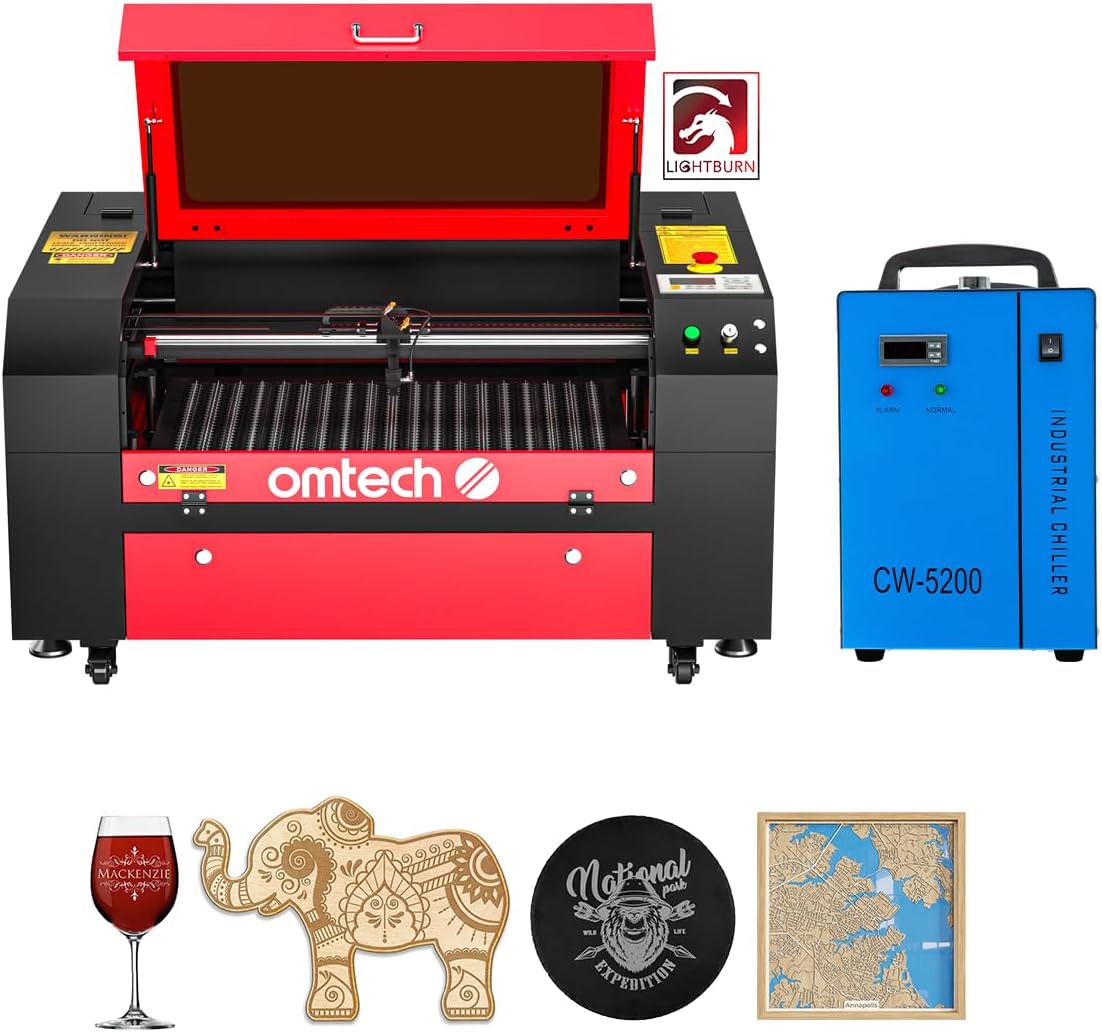
The OMTech Maker 60W CO2 Laser Engraver offers a complete bundle with LightBurn software and a water chiller for stable performance. Its autofocus workbed simplifies setup by automatically finding the correct focal distance with just a button press.
We may earn a commission when you buy through this link, at no additional cost to you.
With a 20 by 28 inch work area, it handles large projects and signs easily. The four-way pass-through doors allow you to accommodate longer items without needing to cut them down. The honeycomb and aluminum blade beds provide versatile support for different material types.
Air assist functionality keeps smoke and dust away from the lens which maintains engraving clarity over time. The flame retardant viewing window ensures safe operation. This machine suits users who prefer CO2 technology for cutting non-metal materials efficiently.
Choose this model if you need a large working area and reliable autofocus features. It is ideal for makers producing large decor or signs where manual focus adjustments would slow down your workflow significantly.
The 20 by 28 inch bed supports oversized projects. Four-way pass-through doors enable seamless integration of long materials into your workflow.
Eliminate manual focus guesswork with the preinstalled autofocus system. Just press a button to adjust the workbed up and down accurately.
We may earn a commission when you buy through this link, at no additional cost to you.
The Creality Falcon2 Pro Enclosure prioritizes user safety with its Class 1 certified cutting and engraving machine design. It features an auto-stop function that halts operation immediately if the enclosure is opened ensuring protection for all experience levels.
We may earn a commission when you buy through this link, at no additional cost to you.
The built-in HD camera visualizes operations and allows batch engraving when connected to LightBurn software. Users can extract patterns from object surfaces directly without separate design software. The enclosure also works with a high-performance exhaust system to filter smoke and reduce noise.
Installation is friendly for beginners as it ships pre-assembled with video guides. Official after-sales service includes lifetime technical support and a 12-month warranty. The design space software offers free options alongside compatibility with paid tools.
This machine is suitable for workshops prioritizing regulatory compliance and safety standards. If you need a reliable unit with robust support and visual workflow tools, the Falcon2 Pro Enclosure delivers strong value for long-term use.
Safety is paramount with auto-stop features that engage when access is detected. This design reduces risk for beginners and professionals alike.
The HD camera provides live previews for better alignment. Extract patterns from surfaces directly without needing external design software.
We may earn a commission when you buy through this link, at no additional cost to you.
The xTool F2 Ultra 60W combines a 60W MOPA fiber laser with a 40W diode laser to master all materials including metals. It delivers vibrant color engraving and precise 3D deep engraving capabilities unmatched by standard diode units.
We may earn a commission when you buy through this link, at no additional cost to you.
With dual 48MP AI cameras, positioning accuracy reaches 0.2mm with one-click focus and preview. The machine operates at speeds up to 15000mm/s, reducing 3D embossing time significantly. Its working space is the largest among desktop fiber laser engravers.
Color files are preset to help you find the right settings for over 100 metal colors without testing. The conveyor expansion enables automated batch processing for high-volume orders. Industrial-grade productivity makes it suitable for advanced manufacturing needs.
This premium machine is best for professionals needing metal marking and diverse material cutting. If budget allows, the F2 Ultra offers unmatched versatility for color engraving and deep cutting tasks.
Achieve over 100 consistent colors on metals with preset files. This feature simplifies the process of creating vibrant designs on stainless steel.
Dual AI cameras increase positioning accuracy by 60 percent. Auto-detection suggests settings for flawless results every time.
We may earn a commission when you buy through this link, at no additional cost to you.
The Monport 60W Fiber Laser Engraver is designed for portable and efficient metal marking tasks. Its integrated mini fiber laser maintains high performance while weighing less than traditional units. The lifespan extends up to 100000 hours for long-term reliability.
We may earn a commission when you buy through this link, at no additional cost to you.
Accuracy reaches 0.01mm thanks to a customized F-theta field mirror and silicon material reflectors. A red dot pointer helps you place designs precisely on the metal surface. It supports 2.5D metal engraving and deep engraving with consistent results.
Software flexibility is provided through LightBurn compatibility and free included software on a USB drive. This makes it accessible for users preferring open-source tools. The compact size fits easily on smaller desks without sacrificing engraving quality.
This machine is perfect for jewelers or makers needing to mark small metal parts. If you prioritize long lifespan and high accuracy in a compact footprint, the Monport 60W Fiber delivers excellent value.
The mini fiber laser design reduces weight and footprint. You can move the machine between workspaces without heavy lifting.
Silicon reflectors and custom mirrors enable 0.01mm accuracy. This precision is essential for intricate designs and fine text.
We may earn a commission when you buy through this link, at no additional cost to you.
The VEVOR 60W CO2 Laser Engraver offers a cost-effective solution for cutting and engraving wood and acrylic. It supports speeds up to 600 mm/s and features a 24 by 16 inch work area for large projects.
We may earn a commission when you buy through this link, at no additional cost to you.
The four-way pass-through design accommodates longer materials which increases versatility. A honeycomb bed and aluminum blade bed provide options for different cutting needs. Manual focusing is simple via the control panel and focusing scale.
Built-in air assist clears dust and smoke effectively. The water pump cooling system ensures stable operation during long runs. Compatible with LightBurn and RDWorks software it integrates well with existing design workflows.
This model is ideal for hobbyists needing a large workspace without a premium price tag. If you prioritize area size and straightforward operation, the VEVOR 60W provides reliable performance for general non-metal projects.
Four-way pass-through allows long materials to pass through easily. This feature expands the range of projects beyond the standard bed size.
Water pump cooling maintains tube stability over time. This ensures consistent power output during extended production sessions.
We may earn a commission when you buy through this link, at no additional cost to you.
The OMTech 60W CO2 Laser Engraver delivers commercial-grade performance with its motorized Autolift workbed. This feature allows easy height adjustment at the touch of a button. The machine engraves as deep as 10 mm on non-metallic materials.
We may earn a commission when you buy through this link, at no additional cost to you.
It reaches speeds of 600 mm/s to transform artistic visions into reality quickly. The 20 by 28 inch work area fits most projects and four-way pass-through doors help with longer items. A water chiller ensures consistent tube performance.
The high-performance DC tube lasts up to 1000 hours depending on usage settings. LightBurn software support simplifies design navigation for users. This bundle is designed to help businesses manage higher output needs.
Choose this machine if you need a large bed and motorized lift for efficiency. It suits commercial operations where consistent tube performance and software support are essential for daily production schedules.
The motorized workbed adjusts height automatically. This removes the guesswork from focusing and speeds up setup time significantly.
Designed for commercial use with a robust tube. Consistent usage at lower settings doubles the lifespan of the laser source.
We may earn a commission when you buy through this link, at no additional cost to you.
The Aliencell X1 Lite 60W Photo-Quality Laser Engraver Cutter offers industrial-level speed with 20000 mm/s squared acceleration. It features a massive 26 by 21 inch bed for large-scale projects. Accurate preview simulation reduces waste by showing exact depth and contrast before processing.
We may earn a commission when you buy through this link, at no additional cost to you.
Intelligent auto-focus locks onto material instantly and crosshair positioning ensures setup in seconds. The machine is SGS certified for Class 1 enclosed safety. It supports Lightburn and offers an intuitive Aliencell Space alternative.
Build quality includes UL94-V0 fire-resistant materials and flame sensors for maximum protection. Local shipping and reliable support are part of the package. Users appreciate the ability to visualize results without guessing parameters.
This model is ideal for professional studios needing photo-quality precision on large materials. If waste reduction and safety certifications are critical, the X1 Lite provides a high-end solution for advanced engraving needs.
See exact depth and contrast before cutting begins. This simulation reduces guesswork and material waste significantly.
20000 mm/s squared acceleration ensures clean sharp results. High frequency pulses deliver smoother gradients and richer detail.
We may earn a commission when you buy through this link, at no additional cost to you.
The Cloudray 60W JPT MOPA Fiber Laser Engraver excels at metal fabrication tasks with a lifespan over 100000 hours. It produces 100+ color markings and reaches speeds of 10000mm/s. The laser source is from JPT ensuring high reliability.
We may earn a commission when you buy through this link, at no additional cost to you.
It includes two F-Theta lenses for different working areas and a manual lift column for adjustable height. Deep engraving capabilities reach 0.5mm on metals. The machine supports intricate designs with 0.01mm accuracy.
Packaging includes safety goggles and USB tools to get started quickly. The manual lift column allows larger working areas due to adjustable height blocks. This portable unit weighs 43 lbs making it transportable.
Choose this model for specialized metal engraving and color marking needs. If you require deep precision and long tube life for industrial marking, the Cloudray MOPA offers robust performance.
Achieve 100+ color markings on metal with the MOPA source. This allows for detailed branding on small items like rings.
Manual lift column supports larger areas with adjustable blocks. This flexibility aids in engraving uneven or tall items.
We may earn a commission when you buy through this link, at no additional cost to you.
Selecting the right 60W laser engraver requires understanding your specific workflow needs. This guide outlines the key factors to consider before making a purchase.
The 60W rating often refers to output power but laser type matters significantly. Diode lasers excel at wood and acrylic while CO2 handles larger non-metal sheets. Fiber lasers like MOPA are specialized for metal engraving and color marking. Ensure the power matches your primary material goals.
Choose a laser type that aligns with your target materials for best results.
Class 1 fully enclosed units are safest for home use as they contain light and smoke. Class 4 machines require safety glasses and specific ventilation protocols. An enclosure with auto-stop features adds a layer of protection against accidents.
Prioritize Class 1 safety if you operate the machine in shared or indoor spaces.
Larger work areas allow for bigger projects but increase the machine footprint. Common sizes range from 5 by 5 inches to 24 by 16 inches. Consider if you need to handle signs or long materials versus small detailed items.
Select a work area that accommodates your largest frequent project sizes.
Most modern machines support LightBurn which offers industry-standard design control. Some brands include proprietary free software to simplify setup. Ensure the software runs on your operating system before buying.
Verify software compatibility with your computer to avoid workflow interruptions.
Built-in cameras enable precise material positioning and batch alignment. High-definition cameras reduce setup time for multiple items. Look for models with auto-focus to speed up the preparation phase.
Invest in camera features if you frequently produce batched or complex designs.
Proper exhaust management is vital for smoke control and lens protection. Some units include built-in exhaust fans while others need external pumps. Water chillers for CO2 lasers maintain stable tube performance.
Ensure your workspace supports the cooling and exhaust needs of the machine.
Reliable after-sales service ensures you can resolve technical issues quickly. Look for warranties covering at least 12 months. Brands offering installation guides and video tutorials save time during setup.
Choose a vendor with responsive support to protect your investment.
Higher prices often reflect better safety features and build quality. Balance your budget with the features you truly need rather than marketing hype. Consider long-term operational costs like maintenance.
Focus on total value rather than just the initial purchase price.
Before starting any engraving task ensure the material is securely placed on the bed. Use clamps or adhesive tape for small items to prevent movement during operation. Verify the focus distance using the built-in auto-focus tool or manual gauge provided.
During operation keep the enclosure closed to contain fumes and light. Monitor the exhaust fan to ensure smoke is vented properly. Avoid leaving the machine unattended for long periods to catch any potential issues quickly.
After each session clean the lens with a soft swab to remove dust and soot. Empty the debris drawer to maintain airflow. Regularly check mirrors and tubes for signs of wear to prolong machine life.
CO2 lasers generally offer larger work areas and better speed for non-metallic materials. Diode lasers are more compact and cost-effective for detailed engraving. Fiber lasers are specialized for marking metals efficiently.
Most 60W diode or CO2 units cannot cut solid metal but can mark coated surfaces. Fiber lasers with MOPA technology are designed to engrave and sometimes cut thin metals effectively.
Class 4 machines require laser safety eyewear for all users. Ensure ventilation systems are connected to remove fumes. Maintain a safe distance from the beam path during operation.
A standard CO2 tube lasts around 1000 to 3500 hours depending on usage. Operating at lower power settings can extend the lifespan significantly. Regular cleaning and cooling help maintain optimal performance.
LightBurn is highly recommended for its robust tools and compatibility with many models. However some machines come with free software that handles basic tasks. Choose the tool that fits your design workflow best.
Yes photo-quality engraving is possible with high-resolution settings. Use dithering techniques in your software to create gradients. Proper material preparation ensures better contrast in the final result.
The Creality Falcon2 Pro 60W and xTool F2 Ultra stand out for their advanced features and safety. Models like the VEVOR offer great value for those needing larger beds at lower costs.
Prioritize safety and software support when making your final decision. Ensure the machine matches your primary material needs to get the best return on investment.
Prices and models update frequently so check current listings before purchasing. Verify the latest specs to ensure compatibility with your workshop requirements.