
ARCTIC P12 Pro A-RGB
4.7Editor score
High static pressure for radiators
3000 RPM PWM speed range
Fluid dynamic bearing for longevity
This guide compares the top addressable RGB fans for PC builds, evaluating cooling performance, lighting quality, noise levels, and ease of installation to
Addressable RGB fans have become a cornerstone of modern PC building, blending high performance cooling with customizable lighting effects. When selecting fans for your system, you need to balance airflow, static pressure, noise levels, and aesthetic appeal. The best options offer seamless synchronization with motherboards and deliver consistent lighting across multiple units without excessive cable clutter.
We evaluated ten leading addressable RGB fan kits based on real-world specifications, user feedback, and technical features like bearing types and PWM control. Our comparison focuses on how well each fan handles heat dissipation in cases and radiators while maintaining quiet operation. We also assessed the ease of installation and the quality of included controllers or daisy-chain capabilities.
Each pick in this list highlights specific strengths such as budget value, premium features, or unique designs like reverse blades. You will find detailed reviews covering performance metrics, pros, cons, and ideal use cases for every model. Please note that product availability and pricing can change frequently, so always verify current details before purchasing.
4.7Editor score

4.7Editor score
4.8Editor score
The following table provides a side-by-side comparison of all ten addressable RGB fan kits reviewed in this guide. It highlights key specifications such as bearing type, maximum RPM, airflow, static pressure, and special features like reverse blades or daisy-chaining to help you quickly identify the best fit for your build.




The Thermalright TL-C12C-S X5 stands out as the top overall choice for builders seeking reliable cooling and aesthetic appeal without breaking the bank. With a rating of 4.7 stars, this 5-pack delivers consistent performance across case fans and CPU coolers. Its S-FDB bearings ensure smooth rotation while minimizing noise, making it ideal for daily work or gaming setups where silence matters.
We may earn a commission when you buy through this link, at no additional cost to you.
Key strengths include its balanced airflow of 66.17 CFM and a maximum speed of 1550 RPM, which provides adequate cooling for most mid-range systems. The ARGB lighting uses atomizing blades to create a soft, diffused glow that blends well with other components. The 17 lighting modes supported through motherboard sync allow you to customize effects without needing extra hardware.
Trade-offs exist, such as the lack of a dedicated fan hub, meaning you may need to daisy-chain fans carefully to avoid port limitations on your motherboard. Additionally, the static pressure is moderate, so it may not push through dense radiators as effectively as higher-pressure models. However, these compromises are acceptable given the budget-friendly price point and overall reliability.
If you are building a new PC or upgrading an old one, the TL-C12C-S X5 offers the best combination of features and affordability. It suits users who want a full set of fans without overspending. We recommend checking motherboard compatibility before purchasing to ensure you have enough headers for your setup.
The S-FDB bearings reduce vibration and noise significantly, ensuring the fans remain whisper-quiet during normal usage while still ramping up when cooling is needed.
High-brightness LED atomizing blades reflect light evenly, creating a softer glow that avoids harsh glare and complements standard PC cases and coolers perfectly.
We may earn a commission when you buy through this link, at no additional cost to you.
The CORSAIR RS120 ARGB triple pack is designed for builders who value clean cable management and high performance. Its daisy-chain connection allows you to control multiple fans through a single PWM and ARGB connector, drastically reducing cable clutter inside the case. With a 4.6 rating, users appreciate the balance of speed and noise control it offers.
We may earn a commission when you buy through this link, at no additional cost to you.
Performance-wise, the fans deliver up to 72.8 CFM of airflow and reach speeds of 2100 RPM. The Magnetic Dome Bearing minimizes friction for quieter operation. CORSAIR AirGuide Technology directs airflow specifically toward hot components, enhancing radiator efficiency. The eight LEDs per fan provide bright, customizable lighting controlled via motherboard sync.
One trade-off is the reliance on CORSAIR iCUE software for advanced lighting and control features, which might be extra work if your system lacks their ecosystem. The price is also higher than generic alternatives. However, the included cabling and premium build quality justify the cost for those prioritizing aesthetics and organization.
This pack is perfect for gamers and enthusiasts who want a unified look across their case without messy cables. Ensure your motherboard supports 5V ARGB sync for best results. Consider this if you plan to expand your fan setup later, as the daisy-chain design scales easily.
Daisy-chaining means only one cable runs to the motherboard per group of fans, leaving more room for airflow and easier cable routing during installation.
Anti-vortex vanes channel air in a focused path, improving static pressure where it matters most for radiators and heatsinks.
We may earn a commission when you buy through this link, at no additional cost to you.
The ARCTIC P12 Pro A-RGB earns its place as the best budget option by delivering exceptional static pressure at a remarkably low price point. Rated 4.7 stars, it is specifically engineered to push air through dense radiators and restrictive panels. This makes it ideal for liquid cooling setups where airflow resistance is a concern.
We may earn a commission when you buy through this link, at no additional cost to you.
Key strengths include its ability to reach 3000 RPM for maximum cooling power when needed. The Fluid Dynamic Bearing ensures longevity and reduces noise at lower speeds. PWM control allows for precise speed adjustments, even stopping completely below 5% duty cycle for silent idle periods. The rotor blades are redesigned for optimal balance.
Trade-offs include simpler lighting options compared to other RGB fans, which may not suit builds focused heavily on aesthetics. At maximum speed, noise can be higher than slower fans. However, these are acceptable given the cooling performance and cost. If your priority is temperature management over light shows, this fan excels.
Buyers looking for a single high-performance fan or a pack to mix with quieter case fans will find this valuable. Ensure your power supply can handle higher RPM demands if running multiple units. We suggest it for radiators where static pressure is critical.
The fan design optimizes air movement against resistance, making it effective for pushing air through radiator fins that typical fans struggle with.
PWM control offers a wide adjustment range, allowing the fan to be nearly silent when idle and full speed under heavy load.
We may earn a commission when you buy through this link, at no additional cost to you.
The Thermaltake CT120 EX ARGB 3-pack introduces MagForce 2.0 magnetic connections that streamline daisy-chaining. Rated 4.6 stars, it offers a unique approach to wiring where fans connect via magnets rather than traditional plugs. This reduces cable clutter and speeds up installation significantly for compatible builds.
We may earn a commission when you buy through this link, at no additional cost to you.
Key strengths include nine addressable LEDs per fan supporting 16.8 million colors via 5V motherboard sync. The optimized hydraulic bearing ensures silent operation while the anti-vibration mounting system minimizes case resonance. These fans fit standard 120mm slots and work well as case or radiator fans.
Trade-offs involve the requirement for 5V ARGB headers specifically and the magnetic connector design which might not fit every case. If your board lacks 5V support, you may need adapters. However, for those with modern boards, the convenience is worth the slight limitation.
This pack suits users who prioritize clean aesthetics and quick setup. Ensure your motherboard supports 5V sync before buying. We recommend this if you want a unique connection method that saves time during building.
Fans connect via magnetic interfaces that lock into place automatically, reducing the need to fiddle with small connectors during installation.
Embedded mounting screws and rubber dampers absorb vibration, ensuring the fans run smoothly without rattling against the case.
We may earn a commission when you buy through this link, at no additional cost to you.
This 6-pack stands out by including four forward and two reverse fans, ideal for builds with bottom or side intake positions. Rated 4.4 stars, it offers a complete solution for airflow and aesthetics. The reverse fans keep lighting visible from all angles, solving a common visibility issue in modern cases.
We may earn a commission when you buy through this link, at no additional cost to you.
Key strengths include 28 ARGB LEDs per fan for brighter lighting and a combined controller hub that manages both PWM and RGB from one place. The three-sided prism design adds visual depth when installed. HDB bearings provide quiet operation at 1550 RPM. The hub reduces cable clutter by centralizing connections.
Trade-offs include a slightly lower user rating and the need to manage the controller cables, which might not simplify every build. However, the reverse blades and included hub add significant value for specific case layouts. If you want a complete kit without buying extras, this is practical.
Consider this for cases requiring reverse intake fans to maximize visual consistency. Ensure your controller fits your power supply connections. We suggest it if you value lighting visibility from the bottom of your chassis.
Reverse blades allow fans to function as intakes while keeping the RGB side facing outward, maintaining a uniform look regardless of airflow direction.
A single hub manages speed and lighting for all fans, reducing motherboard header requirements and keeping cable management tidy.
We may earn a commission when you buy through this link, at no additional cost to you.
The Thermalright TL-C12C-S X3 offers a convenient 3-pack for smaller builds or single radiator upgrades. Rated 4.6 stars, it shares the same high-quality S-FDB bearing and ARGB design as the 5-pack versions. It fits perfectly into cases needing minimal fans without sacrificing performance.
We may earn a commission when you buy through this link, at no additional cost to you.
Key strengths include the consistent 66.17 CFM airflow and 25.6 dBA noise level for silent operation. PWM control allows automatic speed adjustments based on temperature. The ARGB lighting is diffused through atomizing blades, matching coolers perfectly. This pack saves money if you do not need a full case of fans.
Trade-offs are limited to having fewer fans than bulk kits and needing to buy extra units for larger setups. Also, no hub is included, so you manage cables per fan. However, these are minor issues for those building compact PCs. It is a reliable entry point for Thermalright fans.
Buyers with ATX cases or small form factor PCs will find this size appropriate. Verify your motherboard headers can support three fans if you have a full case setup. We suggest it for simple upgrades where cost efficiency is key.
A 3-pack is ideal for cases with limited fan mounts or those who already have a few fans and just need replacements or extras.
The S-FDB bearing design ensures low noise, making this fan suitable for quiet office PCs or bedroom setups.
We may earn a commission when you buy through this link, at no additional cost to you.
Reappearing in our list, this version of the TL-C12C-S X5 reinforces its status as a top silent performer. Rated 4.7 stars, it provides excellent noise control while maintaining solid cooling for standard cases. The 5-pack allows full case replacement without overspending. PWM intelligent temperature control adjusts speeds automatically.
We may earn a commission when you buy through this link, at no additional cost to you.
Key strengths include the reliable S-FDB bearing and 17 ARGB modes for visual customization. The 25.6 dBA noise level makes it one of the quietest in this category. Fans can reach 1550 RPM to move 66.17 CFM of air. This is ideal for daily use where noise is a concern.
Trade-offs include moderate static pressure which may not suit thick radiators. The lighting requires a 5V ARGB header on your motherboard. However, these are typical for budget fans. If you need a full set of quiet fans for a tower, this is a strong choice.
We recommend this for users prioritizing silence over raw pressure. Ensure your case fits standard 120mm fans properly. Consider this if you want a complete upgrade without dealing with high-end pricing.
Fans adjust speeds based on system temperature without manual intervention, ensuring quiet idle and efficient cooling during load.
The ARGB system offers 17 modes that sync with motherboard software for vibrant but not overpowering lighting.
We may earn a commission when you buy through this link, at no additional cost to you.
The Thermaltake CT120 ARGB 2-pack is perfect for targeted upgrades like front intake or rear exhaust. Rated 4.6 stars, it uses a redesigned 7-blade fan for optimized CFM and pressure. Hydraulic bearings ensure smooth and long-lasting operation. Daisy-chain design reduces the cabling needed for multiple fans.
We may earn a commission when you buy through this link, at no additional cost to you.
Key strengths include PWM control reaching 2000 RPM and 9 addressable LEDs for 16.8 million color combinations. The anti-vibration mounting system provides a solid frame that minimizes movement. These fans fit standard cases and radiators well. They are a cost-effective way to replace two old fans.
Trade-offs include limited quantity, so not ideal for full case swaps. Also, lighting sync depends on 5V headers. However, for adding two fans to an existing build, this is a smart choice. The build quality ensures durability over time.
Buyers with a small number of slots to fill will appreciate this size. Ensure your power headers support the daisy-chain connection. We recommend this if you need exactly two fans for a specific cooling solution.
The 7-blade rotor balances airflow and pressure efficiently, making it versatile for both case and radiator mounting.
Anti-vibration mounts and a sturdy frame ensure the fans remain stable even at higher RPMs without shaking.
We may earn a commission when you buy through this link, at no additional cost to you.
The Thermaltake LE120 ARGB 3-pack boasts the highest rating of 4.8 stars, reflecting strong user satisfaction. It is well-suited for radiator mounting or case exhaust. Each fan delivers 66.1 CFM airflow and supports 1500 RPM. The 3-way splitter included makes installation straightforward without extra hardware.
We may earn a commission when you buy through this link, at no additional cost to you.
Key strengths include 9 LEDs powered by 5V ARGB for easy setup. Daisy-chain ARGB cables leave room for other devices. The hydraulic bearing ensures quiet operation. This set offers a great balance of price and performance for standard cooling needs. Users report consistent quality across the pack.
Trade-offs involve the splitter adding some cable bulk and the reliance on 5V motherboard headers. However, for most modern boards, this is standard. The splitter simplifies wiring significantly. This makes the set a strong candidate for simple radiator upgrades.
Consider this if you want a rated set with included cabling. Ensure your motherboard supports 5V sync. We recommend this for those who want a reliable plug-and-play solution for their cooling setup.
The included 3-way splitter allows you to connect three fans with a single motherboard cable, saving time and reducing port usage.
With 66.1 CFM, these fans move enough air for most 120mm radiators without being overly noisy.
We may earn a commission when you buy through this link, at no additional cost to you.
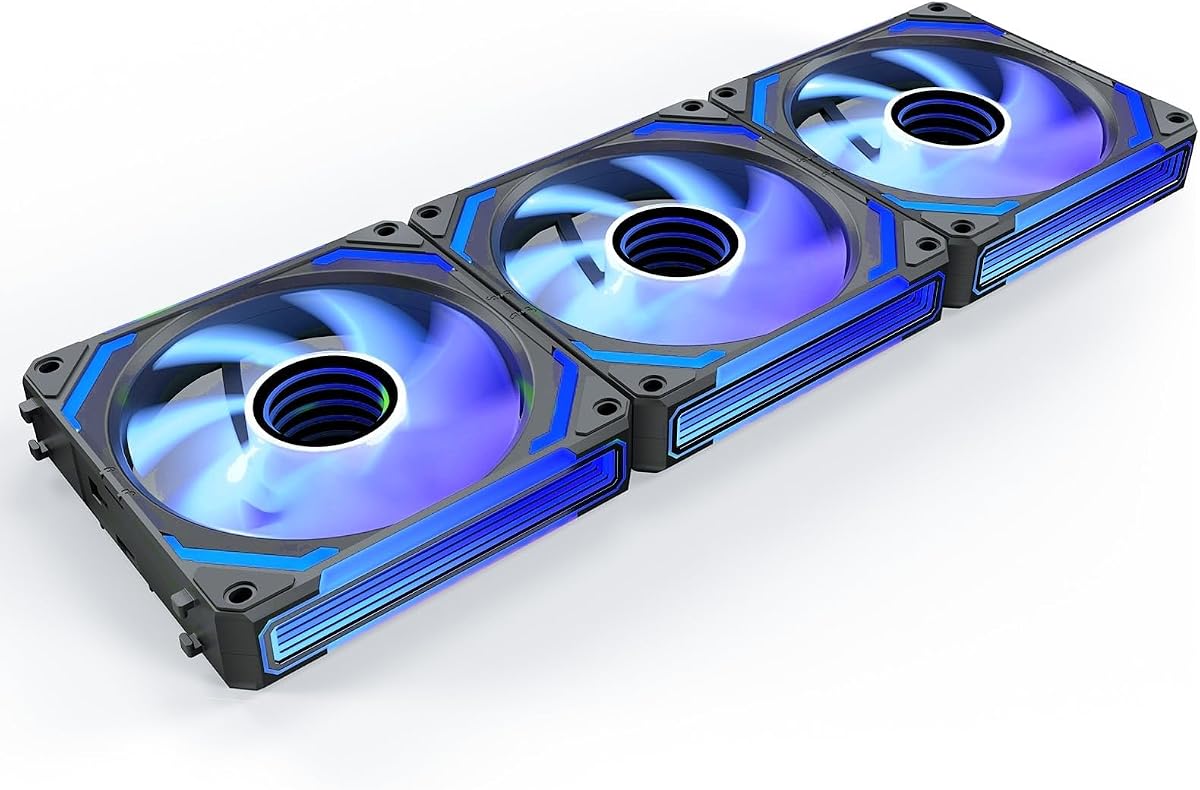
The AsiaHorse COSMIQ 120mm 3-pack delivers a premium look with infinity mirror lighting that creates layered visual effects. Rated 4.8 stars, it stands out with reverse fans for bottom intakes and music sync lighting that responds to audio. FDB bearings ensure smooth operation at up to 2000 RPM.
We may earn a commission when you buy through this link, at no additional cost to you.
Key strengths include 68.5 CFM airflow and 2.05mmH2O static pressure for robust cooling. The controller allows independent lighting control, and the daisy-chain design reduces clutter. This set transforms any PC into a visual showcase while maintaining effective heat dissipation for daily and gaming use.
Trade-offs include the higher cost and need for controller power cables. However, the aesthetic value and unique features justify the investment for enthusiasts. The music sync adds interactive fun. If you want a standout build, these fans are unmatched in appearance.
Buyers seeking high-end visuals will love this pack. Ensure your PSU has enough connectors for the controller. We recommend this for modders who want unique lighting without custom loops.
Reflective layers create an illusion of depth, making the lighting appear to stretch into the fan frame for a premium look.
Built-in sound pickup lets fans react to game sounds or music, adding an interactive element to your gaming setup.
We may earn a commission when you buy through this link, at no additional cost to you.
Selecting the right addressable RGB fans involves balancing performance specifications with aesthetic features. This guide outlines the key factors to consider so you can make an informed decision that fits your build.
Most modern cases use 120mm or 140mm fans. Always check your case's fan mount sizes before buying. Some radiators or custom loops require specific dimensions. Standard 120mm fans are versatile and fit nearly all mounts.
Ensure your case supports the fan thickness and depth you choose. Thick radiators may reduce clearance for standard fans.
Bearing technology affects noise and lifespan. FDB and S-FDB bearings are quiet and long-lasting. Hydraulic bearings offer good durability. Magnetic dome bearings provide stability and low friction.
Look for noise levels below 30 dBA if you prioritize silence. Higher speed fans may be louder under load.
Airflow (CFM) determines how much air moves through your case. Static pressure (mm-H2O) helps air push through obstacles like radiators. High CFM suits cases; high pressure suits radiators.
Choose high pressure fans for dense radiators and airflow fans for open cases to maximize cooling efficiency.
PWM (4-pin) control allows automatic speed adjustments based on temperature. DC (3-pin) uses voltage control which is less precise. Most modern systems support PWM for better management.
Ensure your motherboard supports PWM if you want silent idle and full-speed cooling automatically.
Check if your motherboard supports 5V 3-pin ARGB headers. Some fans require 5V, others 12V 4-pin. Using wrong voltage can damage components. Daisy-chain support reduces wiring needs.
Verify compatibility before buying to avoid adapter needs. Motherboard sync software adds control options.
Fans with daisy-chain connectors reduce clutter by allowing multiple fans to connect via one header. Some include hubs for centralized control. This makes building easier and improves aesthetics inside the case.
Prioritize kits with daisy-chaining if you have limited motherboard ports. It simplifies setup significantly.
Reverse fans allow bottom or side intakes without hiding the RGB side. This is important for cases where fans are visible. They improve airflow without sacrificing looks.
Buy kits with reverse fans if your case has bottom mounts. It keeps lighting visible from all angles.
Prices vary by quantity and features. Multi-packs offer better per-fan value. Premium features like music sync cost more. Assess your budget against needed features.
Budget fans can cool effectively without extras. Decide if aesthetics are worth extra costs.
Install fans securely using screws and anti-vibration mounts to prevent rattling. Ensure airflow direction matches your build plan. Typically, front fans intake air and rear fans exhaust air. Check the arrow on the fan frame to confirm orientation.
Connect PWM cables to motherboard headers for speed control. For ARGB, connect to 5V headers and avoid 12V headers to prevent damage. Use daisy-chain connectors when available to simplify wiring. Ensure cables are tucked away to block airflow.
Regularly clean dust from fan blades using compressed air. Dust buildup adds load and noise. Check connections every few months to ensure they are tight. Monitor system temperatures to verify fans are ramping up correctly under load.
No, 5V ARGB and 12V RGB are not directly compatible and using the wrong voltage can damage fans. Check your motherboard header type before connecting. Adapters exist but should be used with caution to avoid mismatched connections.
Not always. Many fans sync directly via motherboard headers. However, hubs help centralize control and reduce port usage. If you lack headers, a controller with USB connection allows independent lighting control.
Yes, mixing brands works if they share PWM and ARGB standards. Just ensure compatible voltage for lighting. Different brands may not sync via software, but they will work independently.
For silent PCs, aim for speeds below 1000 RPM. Most PWM fans auto-adjust, so keep idle temps low. Use fan curves in BIOS to slow fans during light usage.
Common causes include wrong voltage connection, unsupported software, or loose cables. Check motherboard compatibility first. Update RGB software to latest versions. Ensure all connectors are fully seated.
Reverse fans move air similarly to standard fans but have blades oriented differently. Cooling efficiency remains comparable. The main benefit is visibility from all angles when mounted as intake.
This guide reviewed ten addressable RGB fan kits ranging from budget picks to premium models. The Thermalright TL-C12C-S X5 stands out for overall value, while ARCTIC offers the best budget pressure performance. AsiaHorse delivers high-end visuals with music sync features for those seeking unique lighting.
Prioritize noise levels and static pressure based on your build needs. If you want clean setups, choose daisy-chain options. If aesthetics matter most, consider reverse blades or infinity mirrors. Ensure motherboard compatibility for smooth integration.
Always check current prices and availability before buying since deals change. We hope this comparison helps you select fans that cool efficiently and look amazing. Happy building.